> ## Documentation Index
> Fetch the complete documentation index at: https://docs.abbyy.com/llms.txt
> Use this file to discover all available pages before exploring further.
# ExportToFlexiCaptureExample
> Walk through the ExportToFlexiCaptureExample sample task, which sets variables, runs the Export logic, and returns a verification URL or Document Definition.
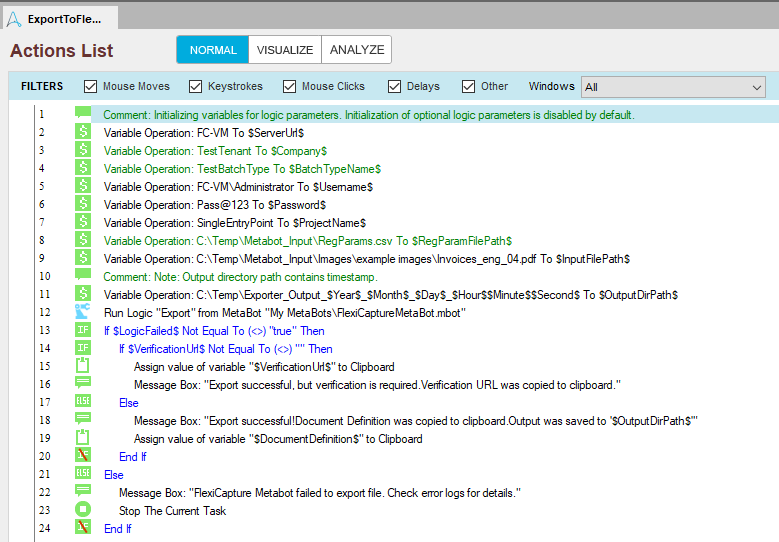
The **ExportToFlexiCaptureExample** sample task includes the following actions.
 ## What the task does
The actions at the start of the task set the values of the variables. The Export logic then runs, and the variables pass in its input parameters.
## Variables the task sets
| Variable | Value it receives |
| -------------------- | -------------------------------------------------------------------------------------------------------------- |
| `LogicFailed` | `true` if an error occurred, in which case check the MetaBot error log. `false` if the logic ran successfully. |
| `VerificationURL` | A URL linking to the verification page. |
| `DocumentDefinition` | The name of the matching Document Definition. |
The task checks the `LogicFailed` output parameter to handle errors from the Export logic.
## What the task reports
If a file submitted by this task requires verification, the task copies the corresponding URL to the Clipboard.
If no verification is required, a message reports that the processing results were saved successfully, and the task copies the name of the matching Document Definition to the Clipboard.
## What the task does
The actions at the start of the task set the values of the variables. The Export logic then runs, and the variables pass in its input parameters.
## Variables the task sets
| Variable | Value it receives |
| -------------------- | -------------------------------------------------------------------------------------------------------------- |
| `LogicFailed` | `true` if an error occurred, in which case check the MetaBot error log. `false` if the logic ran successfully. |
| `VerificationURL` | A URL linking to the verification page. |
| `DocumentDefinition` | The name of the matching Document Definition. |
The task checks the `LogicFailed` output parameter to handle errors from the Export logic.
## What the task reports
If a file submitted by this task requires verification, the task copies the corresponding URL to the Clipboard.
If no verification is required, a message reports that the processing results were saved successfully, and the task copies the name of the matching Document Definition to the Clipboard.