> ## Documentation Index
> Fetch the complete documentation index at: https://docs.abbyy.com/llms.txt
> Use this file to discover all available pages before exploring further.
# Create a case with a workflow
> Add a Pega case type with the data-model fields and life-cycle stages needed to send documents to ABBYY FlexiCapture, verify them, and fetch captured data.
The case stores the document, the ABBYY FlexiCapture batch identifier, and the verification URL. Its life cycle drives the document from upload through verification to captured data.
## Create the case
Open **Dev Studio** and click **Case Types → Add a case type**.
Specify a name for your case, and then click **Submit**.
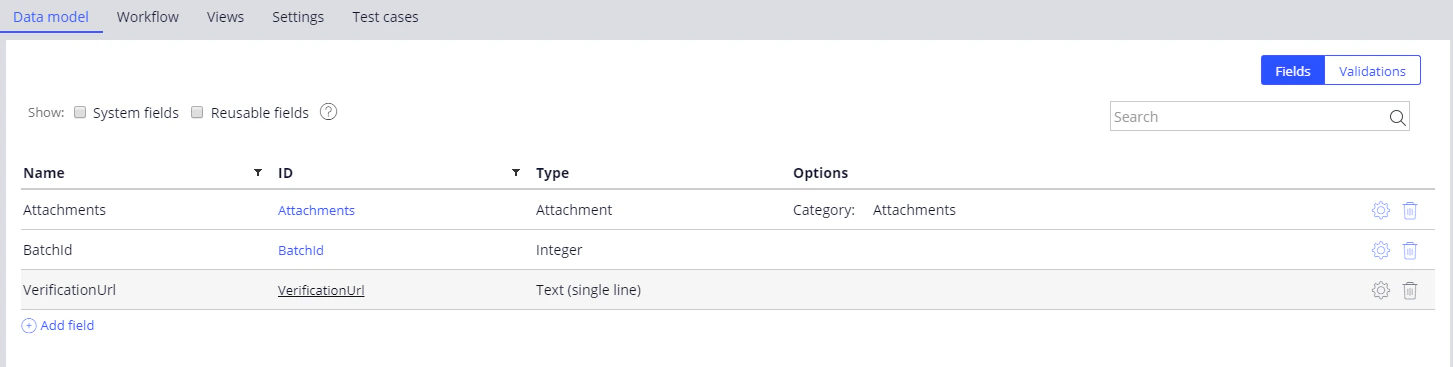
On the **Data model** tab, add the required case fields by clicking **Add field**.
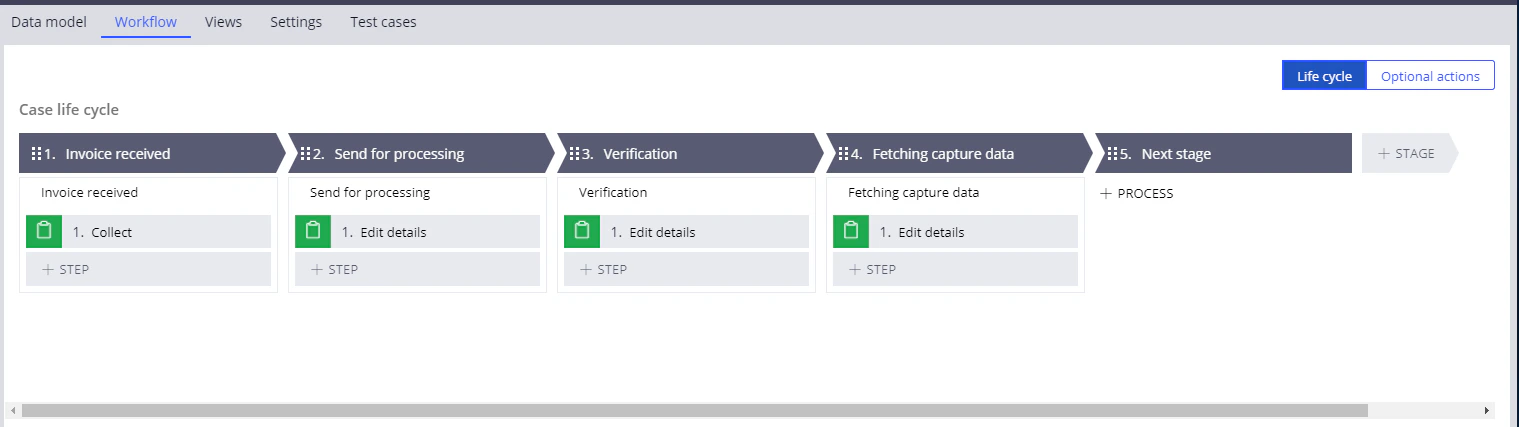
 On the **Workflow** tab, click **Add life cycle** and create the stages with **Collect information** steps.
You can give the stages and steps any names you like.
Click **Save**.
## Required case fields
| Field | Type | Purpose |
| ------------------- | ------------ | -------------------------------------------------------- |
| **Attachments** | `Attachment` | The files, with the **Category: Attachments** option set |
| **BatchId** | `Integer` | The batch identifier |
| **VerificationUrl** | `Text` | The verification URL |
## Life cycle stages
| Stage | What happens at this stage |
| -------------------------- | ------------------------------------------------------------------------------------------------------- |
| **Invoice received** | The first stage. Documents can be added to the case. |
| **Send for processing** | Processing is initiated on the ABBYY FlexiCapture side and Pega starts waiting for a processing status. |
| **Verification** | A verification page is embedded in the case interface using the `iframe` element. |
| **Fetching captured data** | Export results are downloaded from ABBYY FlexiCapture and the case fields are filled in. |
| **Next stage** | Use this stage to include more steps. |
On the **Workflow** tab, click **Add life cycle** and create the stages with **Collect information** steps.
You can give the stages and steps any names you like.
Click **Save**.
## Required case fields
| Field | Type | Purpose |
| ------------------- | ------------ | -------------------------------------------------------- |
| **Attachments** | `Attachment` | The files, with the **Category: Attachments** option set |
| **BatchId** | `Integer` | The batch identifier |
| **VerificationUrl** | `Text` | The verification URL |
## Life cycle stages
| Stage | What happens at this stage |
| -------------------------- | ------------------------------------------------------------------------------------------------------- |
| **Invoice received** | The first stage. Documents can be added to the case. |
| **Send for processing** | Processing is initiated on the ABBYY FlexiCapture side and Pega starts waiting for a processing status. |
| **Verification** | A verification page is embedded in the case interface using the `iframe` element. |
| **Fetching captured data** | Export results are downloaded from ABBYY FlexiCapture and the case fields are filled in. |
| **Next stage** | Use this stage to include more steps. |
 ### What the Send for processing stage does
At this stage, Pega performs the following actions:
* Extracts an image from the case attachment
* Sends the image to ABBYY FlexiCapture for processing
* Records the ABBYY FlexiCapture batch identifier in the case fields
* Waits for the batch processing to finish
* Updates the case field holding the verification URL if the batch has stopped at the verification stage
* Proceeds to the data fetching stage if the batch has been processed completely
### What the Send for processing stage does
At this stage, Pega performs the following actions:
* Extracts an image from the case attachment
* Sends the image to ABBYY FlexiCapture for processing
* Records the ABBYY FlexiCapture batch identifier in the case fields
* Waits for the batch processing to finish
* Updates the case field holding the verification URL if the batch has stopped at the verification stage
* Proceeds to the data fetching stage if the batch has been processed completely