> ## Documentation Index
> Fetch the complete documentation index at: https://docs.abbyy.com/llms.txt
> Use this file to discover all available pages before exploring further.
# Create a multi-document processing case
> Configure a Pega multi-document case: set up data-model fields plus the send-for-processing, verification, and fetch-results stages for FlexiCapture.
A multi-document processing case with verification needs the standard case fields plus the fields for every Document Definition, and three configured workflow stages.
For the general procedure, see [Create a case with a workflow](/flexi-capture/connectors/pega/pega-add-case-type).
 ## Data model fields
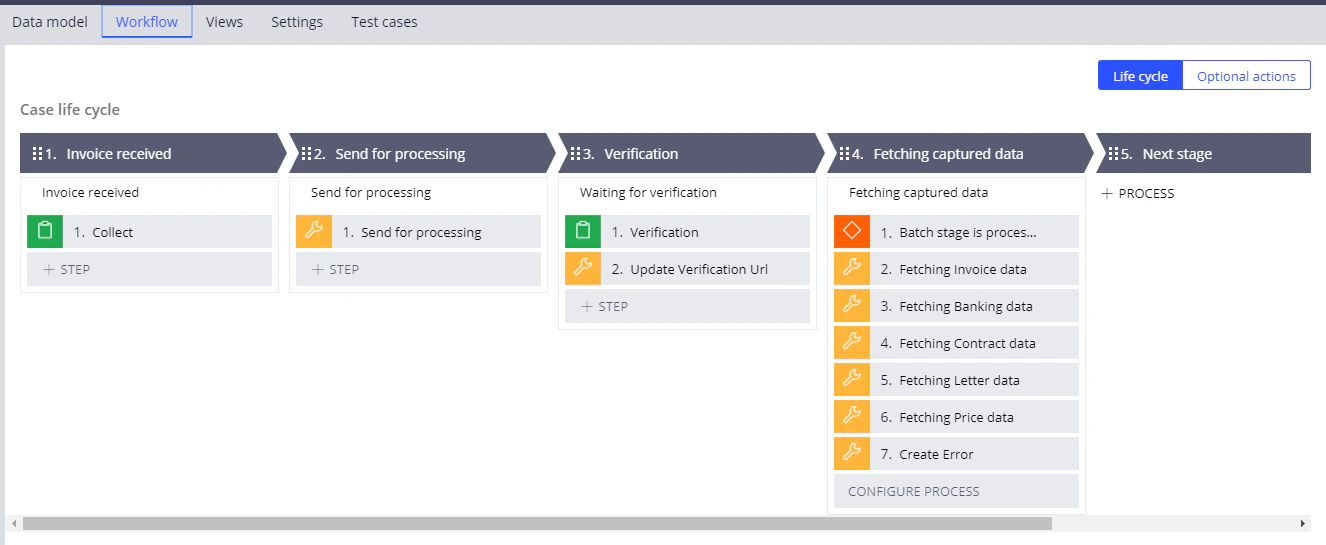
Add the following fields on the **Data Model** tab, in addition to the required **Attachments**, **BatchId**, and **VerificationUrl** fields:
| Name | Id | Type | Options |
| --------------- | ----------------- | ------------------ | ------------------------------------------------------------------------------------------------ |
| Address | `Address` | Field group (list) | Data type: [Address](/flexi-capture/connectors/pega/pega-many-docs-data-types#address) |
| BirthDate | `BirthDate` | Text | |
| City | `City` | Text | |
| ContractDate | `ContractDate` | Text | |
| ContractNumber | `ContractNumber` | Text | |
| DeliveryAddress | `DeliveryAddress` | Text | |
| EmployerName | `EmployerName` | Text | |
| FirstName | `FirstName` | Text | |
| HomePhone | `HomePhone` | Text | |
| Initial | `Initial` | Text | |
| InvoiceCompany | `InvoiceCompany` | Text | |
| InvoiceDate | `InvoiceDate` | Text | |
| InvoiceNumber | `InvoiceNumber` | Text | |
| InvoiceTable | `InvoiceTable` | Field group (list) | Data type: [InvoiceTable](/flexi-capture/connectors/pega/pega-many-docs-data-types#invoicetable) |
| LastName | `LastName` | Text | |
| LetterDate | `LetterDate` | Text | |
| LetterFrom | `LetterFrom` | Text | |
| LetterTo | `LetterTo` | Text | |
| PriceCompany | `PriceCompany` | Text | |
| PriceTable | `PriceTable` | Field group (list) | Data type: [PriceTable](/flexi-capture/connectors/pega/pega-many-docs-data-types#pricetable) |
| SSN | `SSN` | Text | |
| Total | `Total` | Text | |
| WorkPhone | `WorkPhone` | Text | |
## Data model fields
Add the following fields on the **Data Model** tab, in addition to the required **Attachments**, **BatchId**, and **VerificationUrl** fields:
| Name | Id | Type | Options |
| --------------- | ----------------- | ------------------ | ------------------------------------------------------------------------------------------------ |
| Address | `Address` | Field group (list) | Data type: [Address](/flexi-capture/connectors/pega/pega-many-docs-data-types#address) |
| BirthDate | `BirthDate` | Text | |
| City | `City` | Text | |
| ContractDate | `ContractDate` | Text | |
| ContractNumber | `ContractNumber` | Text | |
| DeliveryAddress | `DeliveryAddress` | Text | |
| EmployerName | `EmployerName` | Text | |
| FirstName | `FirstName` | Text | |
| HomePhone | `HomePhone` | Text | |
| Initial | `Initial` | Text | |
| InvoiceCompany | `InvoiceCompany` | Text | |
| InvoiceDate | `InvoiceDate` | Text | |
| InvoiceNumber | `InvoiceNumber` | Text | |
| InvoiceTable | `InvoiceTable` | Field group (list) | Data type: [InvoiceTable](/flexi-capture/connectors/pega/pega-many-docs-data-types#invoicetable) |
| LastName | `LastName` | Text | |
| LetterDate | `LetterDate` | Text | |
| LetterFrom | `LetterFrom` | Text | |
| LetterTo | `LetterTo` | Text | |
| PriceCompany | `PriceCompany` | Text | |
| PriceTable | `PriceTable` | Field group (list) | Data type: [PriceTable](/flexi-capture/connectors/pega/pega-many-docs-data-types#pricetable) |
| SSN | `SSN` | Text | |
| Total | `Total` | Text | |
| WorkPhone | `WorkPhone` | Text | |
 ## Configure the stage that submits a document for processing
For the general procedure, see [Configure the workflow stages](/flexi-capture/connectors/pega/pega-stages-config) and [The Utility step](/flexi-capture/connectors/pega/pega-stages-config#2).
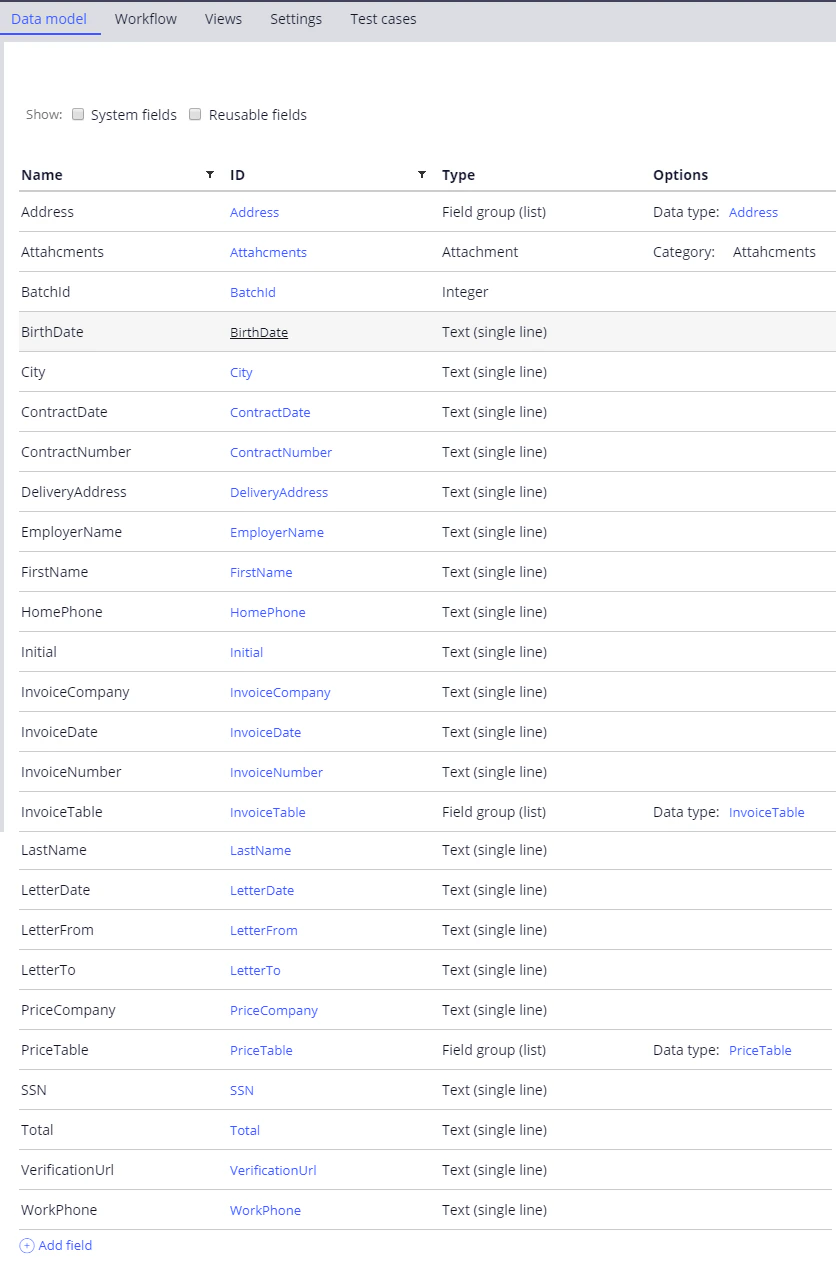
Open the **Send for processing** stage in configuration mode, replace the **Edit details** step with a **Utility** step, and name the step `Send for processing`.
Open the **Utility** step and call the `SendForProcessing` activity.
Start creating the activity by clicking the configuration button to the right of the **Rule** field. Alternatively, leave the `pyUtilityStub` value in the **Rule** field and come back to this step after you have created the activity set.
For more information, see [SendForProcessing](/flexi-capture/connectors/pega/pega-send-for-processing-2).
In the **CaseId** field, specify `.pzInsKey`.
## Configure the stage that submits a document for processing
For the general procedure, see [Configure the workflow stages](/flexi-capture/connectors/pega/pega-stages-config) and [The Utility step](/flexi-capture/connectors/pega/pega-stages-config#2).
Open the **Send for processing** stage in configuration mode, replace the **Edit details** step with a **Utility** step, and name the step `Send for processing`.
Open the **Utility** step and call the `SendForProcessing` activity.
Start creating the activity by clicking the configuration button to the right of the **Rule** field. Alternatively, leave the `pyUtilityStub` value in the **Rule** field and come back to this step after you have created the activity set.
For more information, see [SendForProcessing](/flexi-capture/connectors/pega/pega-send-for-processing-2).
In the **CaseId** field, specify `.pzInsKey`.
 ## Configure the verification stage
For the general procedure, see [Configure the workflow stages](/flexi-capture/connectors/pega/pega-stages-config) and [The Utility step](/flexi-capture/connectors/pega/pega-stages-config#2).
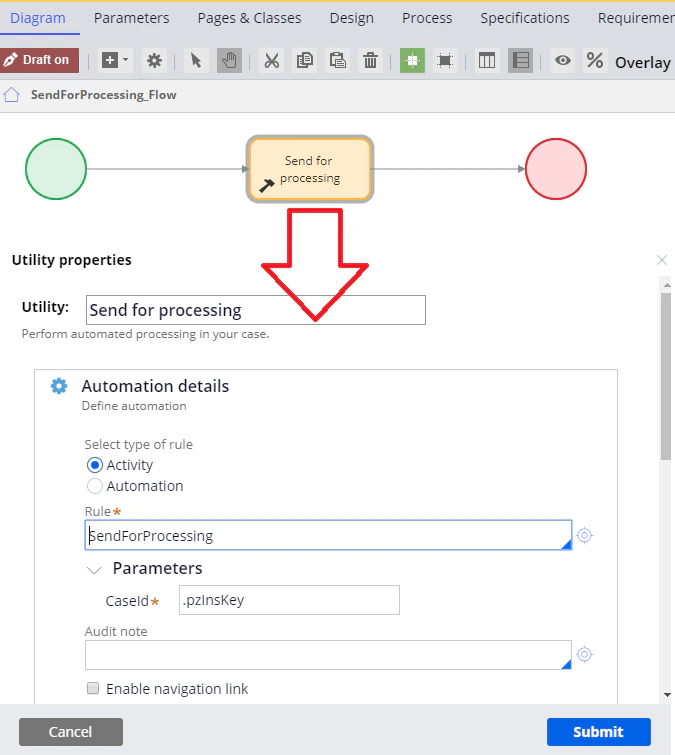
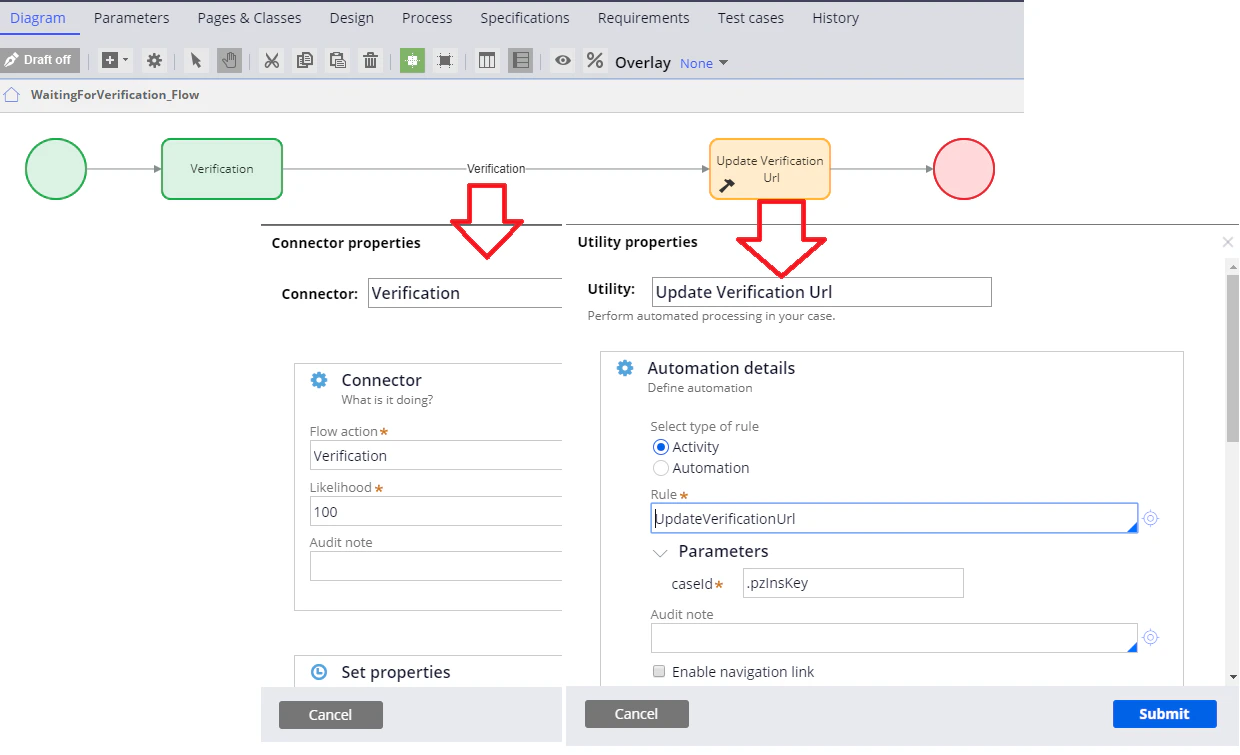
Open the **Verification** stage in configuration mode, add a **Utility** step, and name it `Update Verification Url`.
Rename the **Edit details** step to `Verification`.
Open the **Update Verification Url** step and call the `UpdateVerificationUrl` activity.
For more information, see [UpdateVerificationUrl](/flexi-capture/connectors/pega/pega-update-verification-url-2).
Connect the **Verification** and **Update Verification Url** steps using a **Verification flow action** connector.
For more information, see [Creating a flow action](/flexi-capture/connectors/pega/pega-flow-action).
In the **CaseId** field, specify `.pzInsKey`.
## Configure the verification stage
For the general procedure, see [Configure the workflow stages](/flexi-capture/connectors/pega/pega-stages-config) and [The Utility step](/flexi-capture/connectors/pega/pega-stages-config#2).
Open the **Verification** stage in configuration mode, add a **Utility** step, and name it `Update Verification Url`.
Rename the **Edit details** step to `Verification`.
Open the **Update Verification Url** step and call the `UpdateVerificationUrl` activity.
For more information, see [UpdateVerificationUrl](/flexi-capture/connectors/pega/pega-update-verification-url-2).
Connect the **Verification** and **Update Verification Url** steps using a **Verification flow action** connector.
For more information, see [Creating a flow action](/flexi-capture/connectors/pega/pega-flow-action).
In the **CaseId** field, specify `.pzInsKey`.
 ## Configure the stage that fetches the processing results
For the general procedure, see [Configure the workflow stages](/flexi-capture/connectors/pega/pega-stages-config), [The Utility step](/flexi-capture/connectors/pega/pega-stages-config#2), and [The Decision step](/flexi-capture/connectors/pega/pega-stages-config#3).
## Configure the stage that fetches the processing results
For the general procedure, see [Configure the workflow stages](/flexi-capture/connectors/pega/pega-stages-config), [The Utility step](/flexi-capture/connectors/pega/pega-stages-config#2), and [The Decision step](/flexi-capture/connectors/pega/pega-stages-config#3).
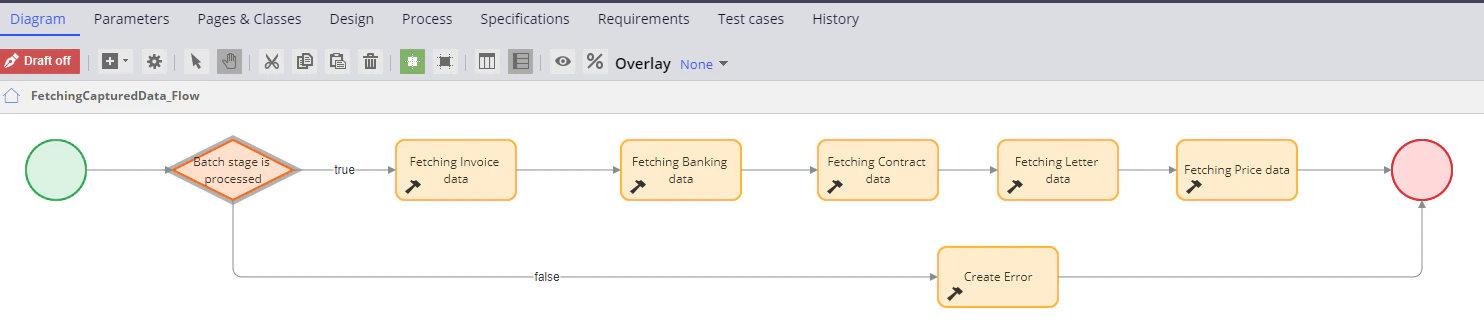 Open the **Fetching captured data** stage in configuration mode and delete the **Edit details** step.
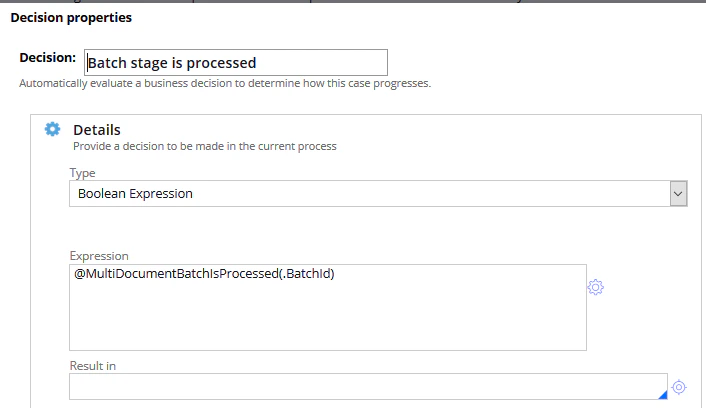
Add a **Decision** step and name it `Batch stage is processed`.
1. Open the step and select **Boolean Expression** in the **Type** field.
2. In the **Expression** field, enter or configure a `@MultiDocumentBatchIsProcessed(.BatchId)` condition.
3. Click **Submit**.
For the function itself, see [MultiDocumentBatchIsProcessed](/flexi-capture/connectors/pega/pega-func-multiple-docs#multidocumentbatchisprocessed).
Open the **Fetching captured data** stage in configuration mode and delete the **Edit details** step.
Add a **Decision** step and name it `Batch stage is processed`.
1. Open the step and select **Boolean Expression** in the **Type** field.
2. In the **Expression** field, enter or configure a `@MultiDocumentBatchIsProcessed(.BatchId)` condition.
3. Click **Submit**.
For the function itself, see [MultiDocumentBatchIsProcessed](/flexi-capture/connectors/pega/pega-func-multiple-docs#multidocumentbatchisprocessed).
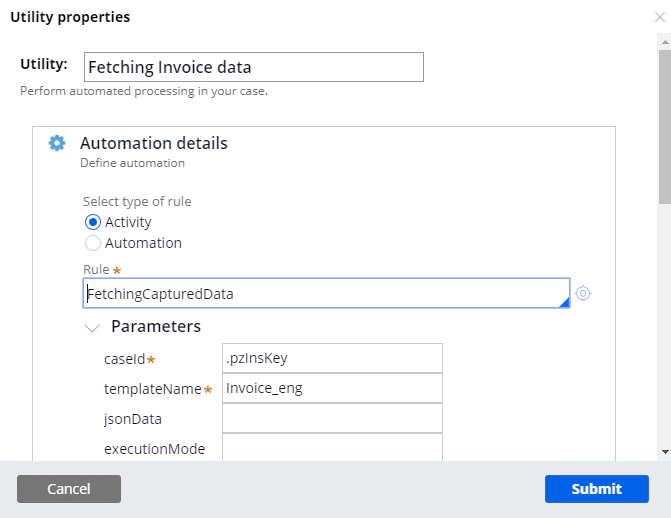
 For the `true` branch, create one **Utility** step per Document Definition. For each step, call the `FetchingCapturedData` activity, enter `.pzInsKey` in the **caseId** field, and set **templateName** to the matching value:
| Utility step name | templateName |
| ------------------------ | -------------- |
| `Fetching Invoice data` | `Invoice_eng` |
| `Fetching Banking data` | `Banking_eng` |
| `Fetching Contract data` | `Contract_eng` |
| `Fetching Letter data` | `Letter_eng` |
| `Fetching Price data` | `Price_eng` |
For more information, see [FetchingCapturedData](/flexi-capture/connectors/pega/pega-fetching-captured-data-2).
For the `true` branch, create one **Utility** step per Document Definition. For each step, call the `FetchingCapturedData` activity, enter `.pzInsKey` in the **caseId** field, and set **templateName** to the matching value:
| Utility step name | templateName |
| ------------------------ | -------------- |
| `Fetching Invoice data` | `Invoice_eng` |
| `Fetching Banking data` | `Banking_eng` |
| `Fetching Contract data` | `Contract_eng` |
| `Fetching Letter data` | `Letter_eng` |
| `Fetching Price data` | `Price_eng` |
For more information, see [FetchingCapturedData](/flexi-capture/connectors/pega/pega-fetching-captured-data-2).
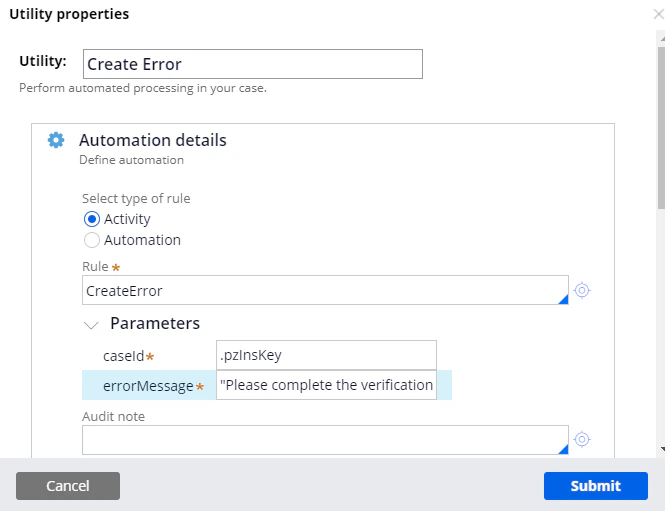
 For the `false` branch, create a **Utility** step named `Create Error`, call the `CreateError` activity, and enter `.pzInsKey` in the **caseId** field.
In the **errorMessage** field, enter this text:
```text theme={null}
Please complete the verification task before proceeding.
```
For more information, see [CreateError](/flexi-capture/connectors/pega/pega-create-error-2).
For the `false` branch, create a **Utility** step named `Create Error`, call the `CreateError` activity, and enter `.pzInsKey` in the **caseId** field.
In the **errorMessage** field, enter this text:
```text theme={null}
Please complete the verification task before proceeding.
```
For more information, see [CreateError](/flexi-capture/connectors/pega/pega-create-error-2).