> ## Documentation Index
> Fetch the complete documentation index at: https://docs.abbyy.com/llms.txt
> Use this file to discover all available pages before exploring further.
# Create the activity steps
> Build the steps and substeps for the Pega CaptureData activity that open the case attachment, call the FlexiCapture library, and apply the JSON Data Transform.
The **CaptureData** activity needs four main steps on the **Steps** tab, plus six substeps that do the processing.
## Create the main steps
Create a new step and set the following fields:
| Field | Value |
| ------------------ | -------------------- |
| **Method** | `Obj-Open-By-Handle` |
| **Step page** | `Case` |
| **InstanceHandle** | `Param.CaseId` |
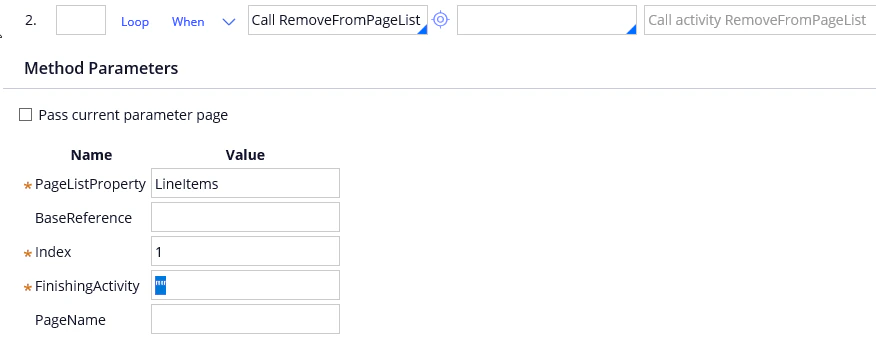
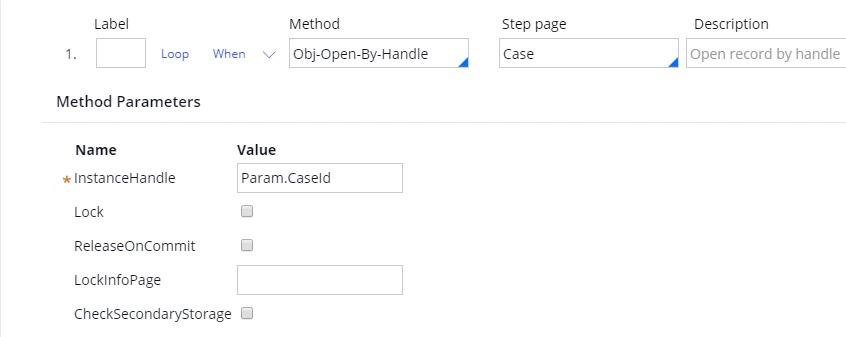 Create a second step and set the following fields:
| Field | Value |
| --------------------- | -------------------------------------------------------------- |
| **Method** | `Call RemoveFromPageList` |
| **PageListProperty** | `LineItems` |
| **Index** | `1`, the index of an empty string that Pega creates by default |
| **FinishingActivity** | `""`, an empty string |
Create a second step and set the following fields:
| Field | Value |
| --------------------- | -------------------------------------------------------------- |
| **Method** | `Call RemoveFromPageList` |
| **PageListProperty** | `LineItems` |
| **Index** | `1`, the index of an empty string that Pega creates by default |
| **FinishingActivity** | `""`, an empty string |
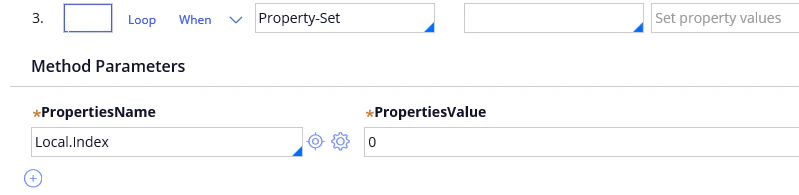
 Create a third step and set the following fields:
| Field | Value |
| ------------------- | -------------- |
| **Method** | `Property-Set` |
| **PropertiesName** | `Local.Index` |
| **PropertiesValue** | `0` |
Create a third step and set the following fields:
| Field | Value |
| ------------------- | -------------- |
| **Method** | `Property-Set` |
| **PropertiesName** | `Local.Index` |
| **PropertiesValue** | `0` |
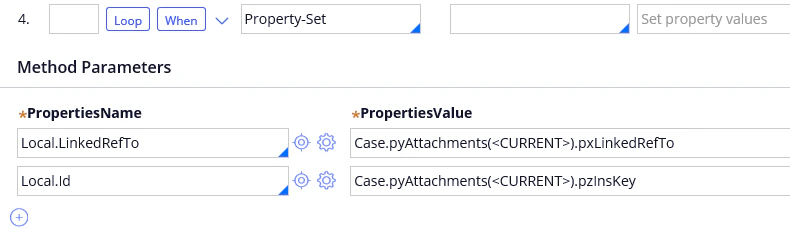
 Create a fourth step, select `Property-Set` in the **Method** field, and create the `Local.LinkedRefTo` and `Local.Id` parameters:
| PropertiesName | PropertiesValue |
| ------------------- | --------------------------------------------- |
| `Local.LinkedRefTo` | `Case.pyAttachments().pxLinkedRefTo` |
| `Local.Id` | `Case.pyAttachments().pzInsKey` |
Create a fourth step, select `Property-Set` in the **Method** field, and create the `Local.LinkedRefTo` and `Local.Id` parameters:
| PropertiesName | PropertiesValue |
| ------------------- | --------------------------------------------- |
| `Local.LinkedRefTo` | `Case.pyAttachments().pxLinkedRefTo` |
| `Local.Id` | `Case.pyAttachments().pzInsKey` |
 ## Add a loop and a condition to the fourth step
Add a loop to the fourth step. Set **Repeat** to **For each element in value list** and the **Value List Property** to `Case.pyAttachments`.
## Add a loop and a condition to the fourth step
Add a loop to the fourth step. Set **Repeat** to **For each element in value list** and the **Value List Property** to `Case.pyAttachments`.
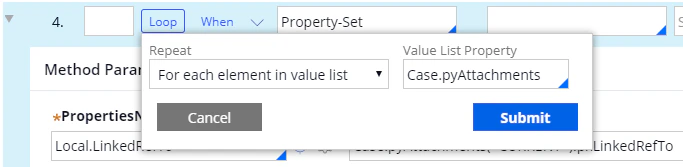 Then add a **When** condition to the same step so that the activity processes only the first attachment:
| When | if true | if false |
| ---------------- | -------------- | --------- |
| `Local.Index==0` | Continue Whens | Skip Step |
Then add a **When** condition to the same step so that the activity processes only the first attachment:
| When | if true | if false |
| ---------------- | -------------- | --------- |
| `Local.Index==0` | Continue Whens | Skip Step |
 ## Create the six substeps
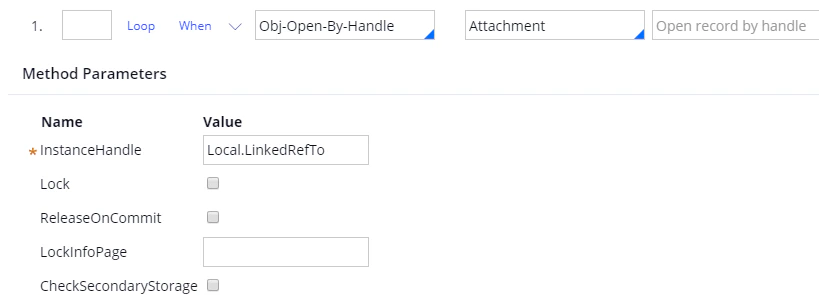
Create six substeps related to the fourth step. To create a substep, create a new step and drag it into the fourth step.
| Field | Value |
| ------------------ | -------------------- |
| **Method** | `Obj-Open-By-Handle` |
| **Step page** | `Attachment` |
| **InstanceHandle** | `Local.LinkedRefTo` |
## Create the six substeps
Create six substeps related to the fourth step. To create a substep, create a new step and drag it into the fourth step.
| Field | Value |
| ------------------ | -------------------- |
| **Method** | `Obj-Open-By-Handle` |
| **Step page** | `Attachment` |
| **InstanceHandle** | `Local.LinkedRefTo` |
 | Field | Value |
| ------------------ | -------------------- |
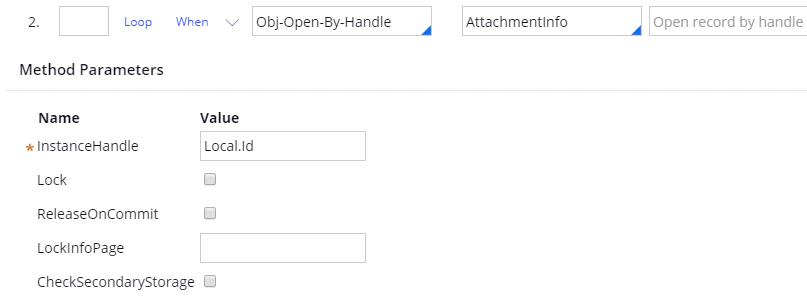
| **Method** | `Obj-Open-By-Handle` |
| **Step page** | `AttachmentInfo` |
| **InstanceHandle** | `Local.Id` |
| Field | Value |
| ------------------ | -------------------- |
| **Method** | `Obj-Open-By-Handle` |
| **Step page** | `AttachmentInfo` |
| **InstanceHandle** | `Local.Id` |
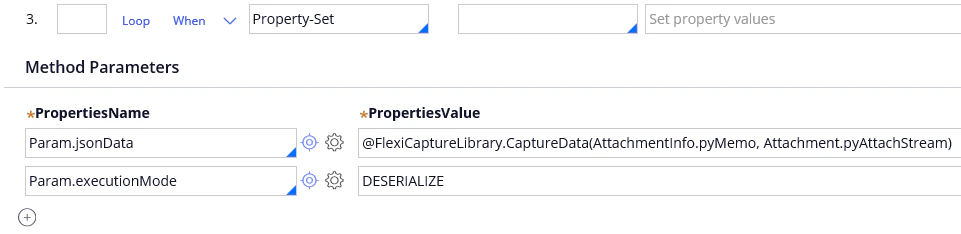
 Select `Property-Set` in the **Method** field and create the following parameters:
| Parameter | Value |
| --------------------- | ------------------------------------------------------------------------------------ |
| `Param.jsonData` | `@FlexiCaptureLibrary.CaptureData(AttachmentInfo.pyMemo, Attachment.pyAttachStream)` |
| `Param.executionMode` | `DESERIALIZE` |
After the `@` character, specify the name of the library, and after the dot, specify the name of the function. For both, see [Create a Java function in Pega](/flexi-capture/connectors/pega/pega-installation-2#java).
Select `Property-Set` in the **Method** field and create the following parameters:
| Parameter | Value |
| --------------------- | ------------------------------------------------------------------------------------ |
| `Param.jsonData` | `@FlexiCaptureLibrary.CaptureData(AttachmentInfo.pyMemo, Attachment.pyAttachStream)` |
| `Param.executionMode` | `DESERIALIZE` |
After the `@` character, specify the name of the library, and after the dot, specify the name of the function. For both, see [Create a Java function in Pega](/flexi-capture/connectors/pega/pega-installation-2#java).
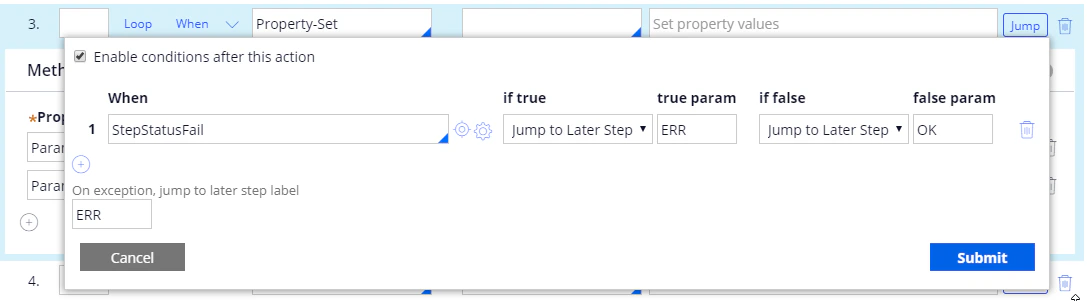
 Then click **Jump** and add a `StepStatusFail` parameter for error handling:
| When | if true | true param | if false | false param | On exception, jump to later step label |
| ---------------- | ------------------ | ---------- | ------------------ | ----------- | -------------------------------------- |
| `StepStatusFail` | Jump to Later Step | `ERR` | Jump to Later Step | `OK` | `ERR` |
Click **Submit**.
Then click **Jump** and add a `StepStatusFail` parameter for error handling:
| When | if true | true param | if false | false param | On exception, jump to later step label |
| ---------------- | ------------------ | ---------- | ------------------ | ----------- | -------------------------------------- |
| `StepStatusFail` | Jump to Later Step | `ERR` | Jump to Later Step | `OK` | `ERR` |
Click **Submit**.
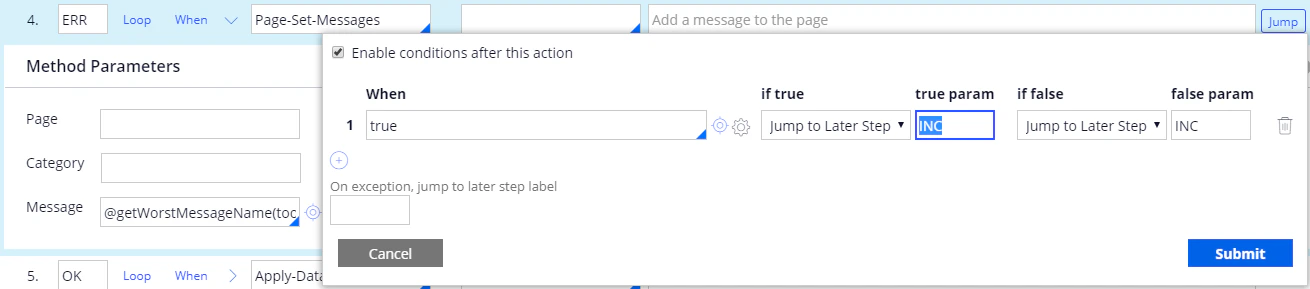
 Select `Page-Set-Messages` in the **Method** field, set the `Message` parameter to `@getWorstMessageName(tools)`, and mark this substep as `ERR`.
To stop the activity performing any subsequent steps when an error occurs, click **Jump** and add the following parameters:
| When | if true | true param | if false | false param |
| ------ | ------------------ | ---------- | ------------------ | ----------- |
| `true` | Jump to Later Step | `INC` | Jump to Later Step | `INC` |
Select `Page-Set-Messages` in the **Method** field, set the `Message` parameter to `@getWorstMessageName(tools)`, and mark this substep as `ERR`.
To stop the activity performing any subsequent steps when an error occurs, click **Jump** and add the following parameters:
| When | if true | true param | if false | false param |
| ------ | ------------------ | ---------- | ------------------ | ----------- |
| `true` | Jump to Later Step | `INC` | Jump to Later Step | `INC` |
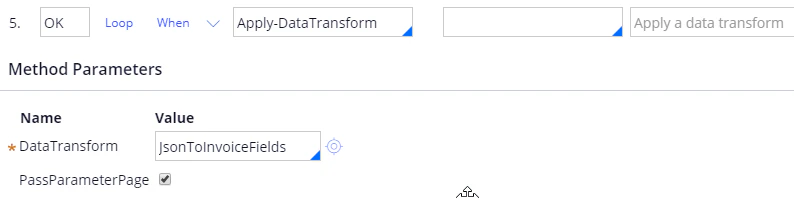
 Select `Apply-DataTransform` in the **Method** field and set the `DataTransform` parameter to `JsonToInvoiceFields`.
Mark this substep as `OK` and select the **PassParameterPage** option.
Select `Apply-DataTransform` in the **Method** field and set the `DataTransform` parameter to `JsonToInvoiceFields`.
Mark this substep as `OK` and select the **PassParameterPage** option.
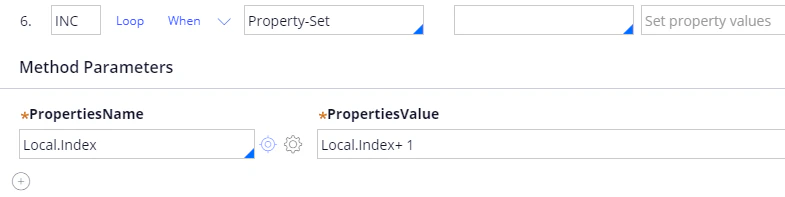
 Select `Property-Set` in the **Method** field, create a `Local.Index` parameter, and set it to `Local.Index + 1`.
Mark this substep as `INC`.
Select `Property-Set` in the **Method** field, create a `Local.Index` parameter, and set it to `Local.Index + 1`.
Mark this substep as `INC`.
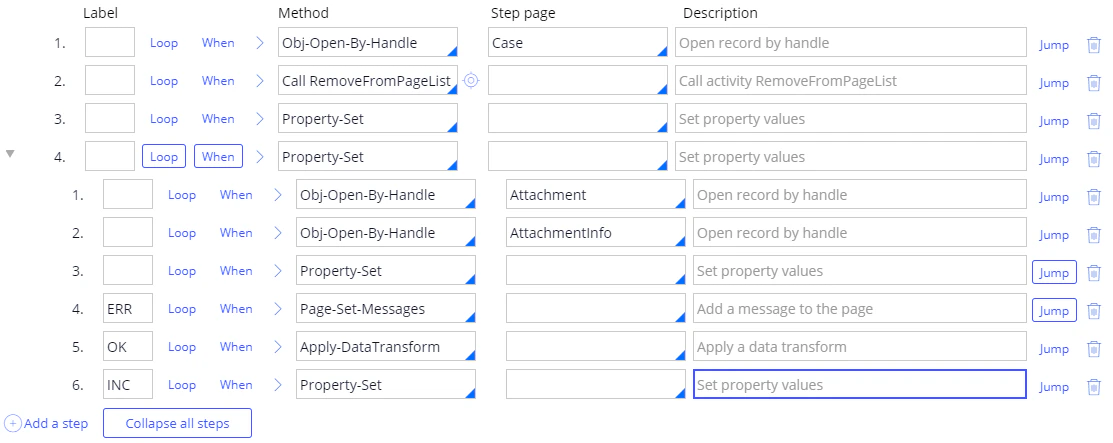
 Your list of steps and substeps should now look as follows.
 ## Finish the activity
Click **Save**.
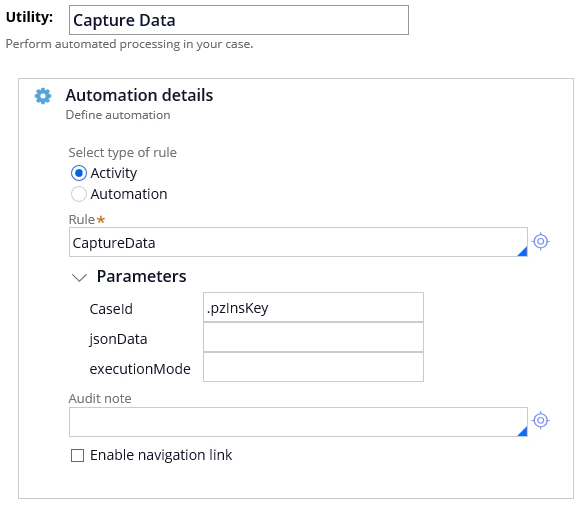
Open the properties of the **Utility** item, select `CaptureData` in the **Rule** field, and set the **CaseId** parameter to `.pzInsKey`.
## Finish the activity
Click **Save**.
Open the properties of the **Utility** item, select `CaptureData` in the **Rule** field, and set the **CaseId** parameter to `.pzInsKey`.
 Save your changes.