> ## Documentation Index
> Fetch the complete documentation index at: https://docs.abbyy.com/llms.txt
> Use this file to discover all available pages before exploring further.
# UiPath Processes
> Reference for the ABBYY FlexiCapture Multi-Task processes in UiPath: Batch Sender, Batch Monitor, Batch Verifier, Batch Fetcher, and Batch Processor.
The FC Multi-Task Package includes the following processes:
* [Batch Sender](#batchsender)
* [Batch Monitor](#batchmonitor)
* [Batch Verifier](#batchverifier)
* [Batch Fetcher](#batchfetcher)
* [Batch Processor – single process](#batchprocessorsingleprocess)
## Batch Sender
This process takes files from a folder and uses the **Create Batch** activity to send them to FC 12 for processing. FC will create a single batch for each file it finds in that folder. Next, the ID of the newly created batch is added to the **Monitor Queue** for subsequent processing in the **Batch Monitor** process.
## Batch Monitor
This is a constantly running process which handles items in the **Monitor Queue**.
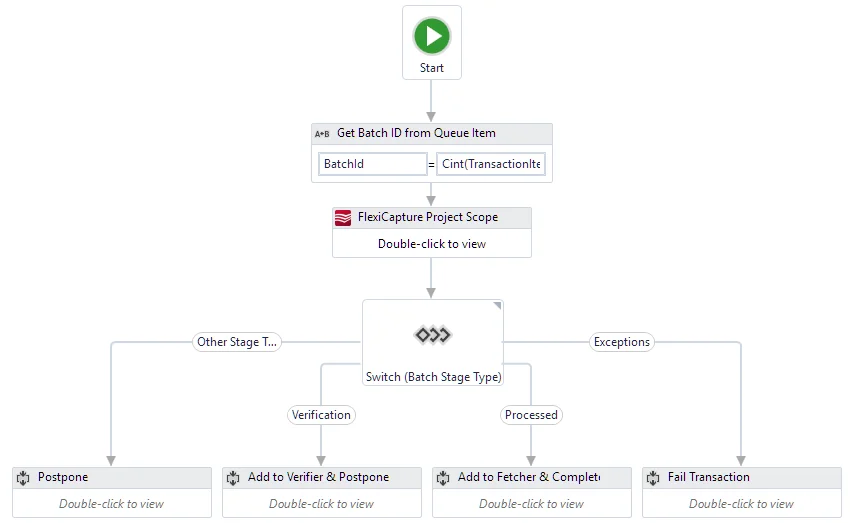 Using the **Get Batch Stage** activity, it gets the stage of a batch and performs the following:
* For a batch at the "**Processed**" stage, a new item will be added to the **Fetcher Queue**, after which the item in the **Monitor Queue** will be marked as successfully processed.
* For a batch at the "**Verification**" stage, a new item will be added to the **Verifier Queue** and the processing of the item in the **Monitor Queue** will be postponed. The element will not be added to the **Verifier Queue** once again.
* If a batch is at the "**Exceptions**" stage (where they may be placed due to processing errors), an item in **Monitor Queue** will be marked as an exception. The text of the error message will be recorded in the "**Reason**" section.
* For a batch at any other stage, the processing of the **Monitor Queue** will be postponed.
We recommend that you launch this process from UiPath Orchestrator.
## Batch Verifier
This process handles items from the **Verifier Queue**, one item at a time. It gets verification URLs by the ID of the batch and opens them in a browser, where the respective documents can be verified by the verifier. Once verified, an item is marked as completed.
## Batch Fetcher
This is a constantly running process which handles items from the **Fetcher Queue**. It accepts batch processing results and saves the export files created for each document in a batch. Once the export files are saved, the process marks the item as successfully processed.
## Batch Processor – single process
This process performs a full document processing procedure in FC: creates batches, checks their status, gets verification URLs, and downloads the processing results. **Batch Processor - single process** comprises the following processes: **Batch Sender**, **Batch Monitor**, **Batch Verifier**, and **Batch Fetcher**.
This process does not require UiPath Orchestrator assets and queues. It can be launched from the UiPath Studio without connecting a Robot to the Orchestrator.
Using the **Get Batch Stage** activity, it gets the stage of a batch and performs the following:
* For a batch at the "**Processed**" stage, a new item will be added to the **Fetcher Queue**, after which the item in the **Monitor Queue** will be marked as successfully processed.
* For a batch at the "**Verification**" stage, a new item will be added to the **Verifier Queue** and the processing of the item in the **Monitor Queue** will be postponed. The element will not be added to the **Verifier Queue** once again.
* If a batch is at the "**Exceptions**" stage (where they may be placed due to processing errors), an item in **Monitor Queue** will be marked as an exception. The text of the error message will be recorded in the "**Reason**" section.
* For a batch at any other stage, the processing of the **Monitor Queue** will be postponed.
We recommend that you launch this process from UiPath Orchestrator.
## Batch Verifier
This process handles items from the **Verifier Queue**, one item at a time. It gets verification URLs by the ID of the batch and opens them in a browser, where the respective documents can be verified by the verifier. Once verified, an item is marked as completed.
## Batch Fetcher
This is a constantly running process which handles items from the **Fetcher Queue**. It accepts batch processing results and saves the export files created for each document in a batch. Once the export files are saved, the process marks the item as successfully processed.
## Batch Processor – single process
This process performs a full document processing procedure in FC: creates batches, checks their status, gets verification URLs, and downloads the processing results. **Batch Processor - single process** comprises the following processes: **Batch Sender**, **Batch Monitor**, **Batch Verifier**, and **Batch Fetcher**.
This process does not require UiPath Orchestrator assets and queues. It can be launched from the UiPath Studio without connecting a Robot to the Orchestrator.