> ## Documentation Index
> Fetch the complete documentation index at: https://docs.abbyy.com/llms.txt
> Use this file to discover all available pages before exploring further.
# Hypotheses and trees of hypotheses
> Hypotheses in ABBYY FlexiLayout Studio are candidate matches for elements: see how quality is calculated, what null hypotheses are, and a worked example.
A **hypothesis** is an assumption made by FlexiLayout Studio that the detected object or objects correspond to a particular element, that is, meet the properties and search criteria specified for the element.
The element's search area may contain several objects or sets of objects that all correspond to the element. In this case, FlexiLayout Studio formulates a hypothesis for each detected object.
For convenience, the term *hypothesis* is also used to refer to the set of objects included in a particular hypothesis.
## How hypothesis quality is calculated
The **quality** of a hypothesis measures how well the detected object matches the description in the corresponding element. It is a numerical value from 0 to 1.
FlexiLayout Studio calculates the quality of a hypothesis as **Pre-search quality × Post-search quality**, where:
* **Pre-search quality** – The quality of the settings made in the **Properties** dialog box and in the **Advanced pre-search relations** field.
* **Post-search quality** – The result of applying the conditions specified in the **Advanced post-search relations** field.
The quality of a hypothesis for a Group element is calculated by multiplying the qualities of the hypotheses for all the constituent elements.
## Null hypotheses
For [optional elements](/flexi-capture/fls/template/elements-optional), FlexiLayout Studio formulates a null hypothesis.
A **null hypothesis** is a hypothesis that FlexiLayout Studio formulates when it detects no objects corresponding to an optional element in the search area.
If FlexiLayout Studio does not find any objects corresponding to an optional element, it does not stop matching the FlexiLayout. Instead, it formulates a null hypothesis and assigns it a quality that you set when creating the optional element.
## Hypotheses: a practical example
Suppose you need to create two elements to find two static texts on your images. The first static text is "mother", the second is "father", and the text "father" is always located below the text "mother".
Create two Static Text elements. The first, **StaticText1**, looks for the text "mother", and the second, **StaticText2**, looks for the text "father". Assume that both elements are optional and that the quality of the null hypothesis for each of them is set to 0.97.
No constraints are set on the search area for **StaticText1**. Because the text "father" is always located below the text "mother", you can specify that **StaticText2** must always be located below **StaticText1**. To do this, type the corresponding constraint on the **Relations** tab in the **Properties** dialog box of the **StaticText2** element: `Below: SearchElements.StaticText1;`.
The following figure shows the results of matching the FlexiLayout with an image on which the word "mother" occurs twice (above and below the word "father") and one OCR error has been made in the word "mother" located above the word "father".
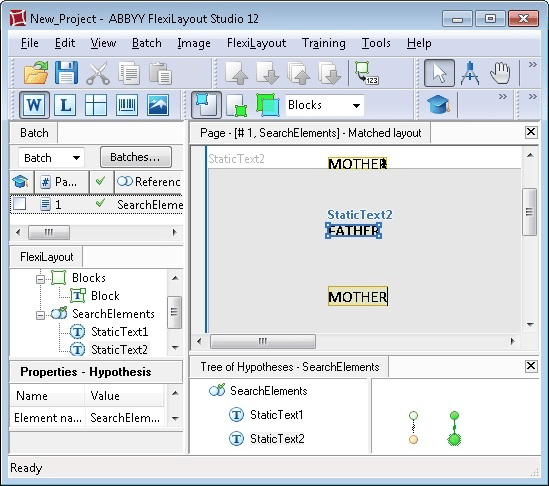 Matching the FlexiLayout has generated two hypotheses for the **StaticText1** element. The first hypothesis corresponds to the word "mother" recognized with one OCR error and located above the word "father" and has a quality of 0.98. The second hypothesis corresponds to the word "mother" located below the word "father" and has a quality of 1.
At this stage, the quality of each chain is the same as the quality of the corresponding hypothesis. Therefore, the best chain consists of the hypothesis with a quality of 1.
Since the **StaticText2** element must be located below the **StaticText1** element, and FlexiLayout Studio has generated two hypotheses for the **StaticText1** element, it now tries to find the required static text in two search areas.
If FlexiLayout Studio pursues the second hypothesis with a quality of 1, which found the word "mother" below the word "father", it fails to find the **StaticText2** element below the **StaticText1** element. Consequently, it generates a null hypothesis with a quality of 0.97, and the quality of the resulting chain of hypotheses is 1 × 0.97 = 0.97.
If FlexiLayout Studio pursues the first hypothesis with a quality of 0.98, which found the word "mother" above the word "father", it successfully detects the **StaticText2** element below the **StaticText1** element and generates a hypothesis with a quality of 1. The quality of the resulting chain of hypotheses is 0.98 × 1 = 0.98.
As a result, FlexiLayout Studio selects the chain with an overall quality of 0.98.
Matching the FlexiLayout has generated two hypotheses for the **StaticText1** element. The first hypothesis corresponds to the word "mother" recognized with one OCR error and located above the word "father" and has a quality of 0.98. The second hypothesis corresponds to the word "mother" located below the word "father" and has a quality of 1.
At this stage, the quality of each chain is the same as the quality of the corresponding hypothesis. Therefore, the best chain consists of the hypothesis with a quality of 1.
Since the **StaticText2** element must be located below the **StaticText1** element, and FlexiLayout Studio has generated two hypotheses for the **StaticText1** element, it now tries to find the required static text in two search areas.
If FlexiLayout Studio pursues the second hypothesis with a quality of 1, which found the word "mother" below the word "father", it fails to find the **StaticText2** element below the **StaticText1** element. Consequently, it generates a null hypothesis with a quality of 0.97, and the quality of the resulting chain of hypotheses is 1 × 0.97 = 0.97.
If FlexiLayout Studio pursues the first hypothesis with a quality of 0.98, which found the word "mother" above the word "father", it successfully detects the **StaticText2** element below the **StaticText1** element and generates a hypothesis with a quality of 1. The quality of the resulting chain of hypotheses is 0.98 × 1 = 0.98.
As a result, FlexiLayout Studio selects the chain with an overall quality of 0.98.