> ## Documentation Index
> Fetch the complete documentation index at: https://docs.abbyy.com/llms.txt
> Use this file to discover all available pages before exploring further.
# Labeled Field
> Labeled Field is a compound element that finds named fields: configure label text, field position, and content types such as number, date, or phone.
Labeled Field is a compound element which the program uses to search for fields that have names. A Labeled Field element includes the following subelements:
* Static Text, which contains the name of the field
* [White Gap](/flexi-capture/fls/template/white-gap), which describes the gap between the name and the data of the field
* an element which describes the contents of the field; the type of this field depends on the type of field contents
Labeled Field elements are marked with  in the tree.
If required, a Labeled Field element may be represented as a group.
When searching for the name of a field, the program will consider the Recognized Words and Recognized Lines objects detected by [pre-recognition](/flexi-capture/fls/batch/prerecognition) and falling within the element's search area. Once the name of the field is detected, the program searches for a field whose contents matches the description provided in the element.
## Name properties
The name of a field is described by a [Static Text](/flexi-capture/fls/template/static-text) element.
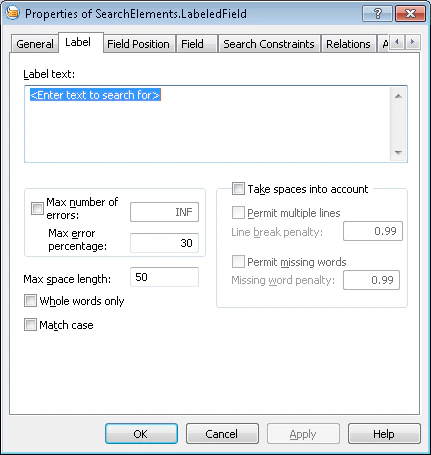
The properties of the name are specified on the Label tab of the element's Properties dialog box. To open the element's Properties dialog box, in the FlexiLayout window, right-click the element and select Properties... from the shortcut menu.
in the tree.
If required, a Labeled Field element may be represented as a group.
When searching for the name of a field, the program will consider the Recognized Words and Recognized Lines objects detected by [pre-recognition](/flexi-capture/fls/batch/prerecognition) and falling within the element's search area. Once the name of the field is detected, the program searches for a field whose contents matches the description provided in the element.
## Name properties
The name of a field is described by a [Static Text](/flexi-capture/fls/template/static-text) element.
The properties of the name are specified on the Label tab of the element's Properties dialog box. To open the element's Properties dialog box, in the FlexiLayout window, right-click the element and select Properties... from the shortcut menu.
 ### Position of a field relative to its name
The position of a filed relative to its name is specified on the Field Position tab.
### Position of a field relative to its name
The position of a filed relative to its name is specified on the Field Position tab.
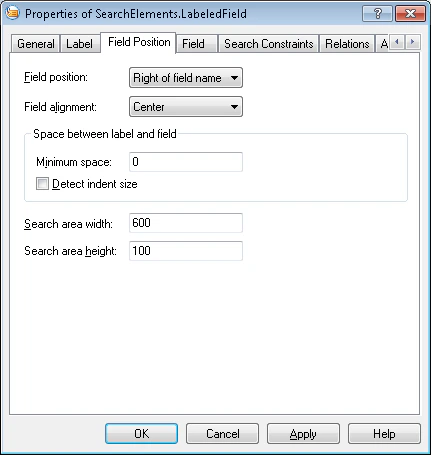 * Field Position\
Specifies the position of the field relative to its name (to the right, to the left, above, or below).
* Field alignment\
Specifies the alignment of the field's search area relative to the rectangle enclosing the name. The value here depends on the value of the Field Position field:
* If the field is positioned to the right or to the left of the name, its search area may be aligned by the top or bottom boundary, or it may be centered
* If the field is positioned above or below the name, its search area may be aligned by the left or right boundary, or it may be centered
* Minimum space\
Specifies the minimum space between the name and the field (in user-defined units of measurement)
* Search area width\
Specifies the width of the search area (in user-defined units of measurement)
* Search area height\
Specifies the height of the search area (in user-defined units of measurement)
* Detect indent size\
A flag that specifies whether a [White Gap](/flexi-capture/fls/template/white-gap) element should be used to detect the distance between the field and its name. If this option is cleared, the search area of the distance begins from the value specified in the Minimum space field. Otherwise, starting from this distance, an auxiliary [White Gap](/flexi-capture/fls/template/white-gap) element is generated and the search area begins after this element.
### Field search constraints
The search constraints for a field are specified on the Field Position tab.
* Field Position\
Specifies the position of the field relative to its name (to the right, to the left, above, or below).
* Field alignment\
Specifies the alignment of the field's search area relative to the rectangle enclosing the name. The value here depends on the value of the Field Position field:
* If the field is positioned to the right or to the left of the name, its search area may be aligned by the top or bottom boundary, or it may be centered
* If the field is positioned above or below the name, its search area may be aligned by the left or right boundary, or it may be centered
* Minimum space\
Specifies the minimum space between the name and the field (in user-defined units of measurement)
* Search area width\
Specifies the width of the search area (in user-defined units of measurement)
* Search area height\
Specifies the height of the search area (in user-defined units of measurement)
* Detect indent size\
A flag that specifies whether a [White Gap](/flexi-capture/fls/template/white-gap) element should be used to detect the distance between the field and its name. If this option is cleared, the search area of the distance begins from the value specified in the Minimum space field. Otherwise, starting from this distance, an auxiliary [White Gap](/flexi-capture/fls/template/white-gap) element is generated and the search area begins after this element.
### Field search constraints
The search constraints for a field are specified on the Field Position tab.
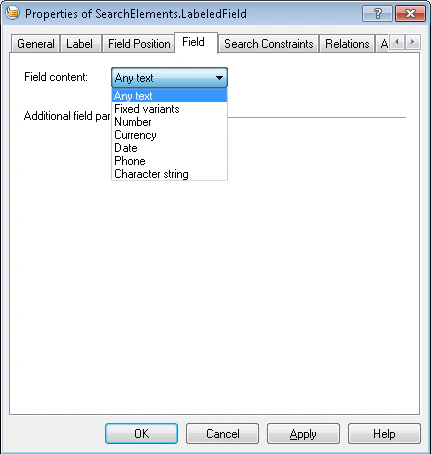 **Field Content** - specifies the type of the field's contents. Depending on the type of the field, the Field Position tab may include additional search constraints:
This type coincides with type [Static Text](/flexi-capture/fls/template/static-text) and has the same properties.
* Value interval\
The range of possible values. Possible values range from -2147483648 to 2147483647.
* Signs and Separators includes two settings that determine whether the program should look for signs and fraction separators:
* Take sign into account indicates that the number can have a sign.
* Can be fractional indicates that the number can include a fractional part.
This type has the property Currency names, which is completely identical to the property of the [Currency](/flexi-capture/fls/template/currency) type of the same name.
This type coincides with type [Date](/flexi-capture/fls/template/date) and has the same properties.
This type has the properties Min number of digits and Max number of digits, which are completely identical to the corresponding property of type [Phone](/flexi-capture/fls/template/phone) of the same names.
This type has the following properties:
* **Alphabet** specifies a set of allowed characters. Works in the same way as the Alphabet property from the [Character String](/flexi-capture/fls/template/character-chain) type.
* Regular expression specifies the expression to be used as the search pattern. This property is completely identical to the property of type [Character String](/flexi-capture/fls/template/character-chain) of the same name.
* **Min length** specifies the minimum length of the string
* **Max** **length** specifies the maximum length of the string
## Related topics
Insert, draw, move, copy, and delete elements in the FlexiLayout tree.
Review general settings, geometry, search areas, relations, and constraints in element properties.
Tell a FlexiLayout where to look using absolute coordinates or element relations.
Convert Labeled Field elements to groups to access subelement methods and functions.
**Field Content** - specifies the type of the field's contents. Depending on the type of the field, the Field Position tab may include additional search constraints:
This type coincides with type [Static Text](/flexi-capture/fls/template/static-text) and has the same properties.
* Value interval\
The range of possible values. Possible values range from -2147483648 to 2147483647.
* Signs and Separators includes two settings that determine whether the program should look for signs and fraction separators:
* Take sign into account indicates that the number can have a sign.
* Can be fractional indicates that the number can include a fractional part.
This type has the property Currency names, which is completely identical to the property of the [Currency](/flexi-capture/fls/template/currency) type of the same name.
This type coincides with type [Date](/flexi-capture/fls/template/date) and has the same properties.
This type has the properties Min number of digits and Max number of digits, which are completely identical to the corresponding property of type [Phone](/flexi-capture/fls/template/phone) of the same names.
This type has the following properties:
* **Alphabet** specifies a set of allowed characters. Works in the same way as the Alphabet property from the [Character String](/flexi-capture/fls/template/character-chain) type.
* Regular expression specifies the expression to be used as the search pattern. This property is completely identical to the property of type [Character String](/flexi-capture/fls/template/character-chain) of the same name.
* **Min length** specifies the minimum length of the string
* **Max** **length** specifies the maximum length of the string
## Related topics
Insert, draw, move, copy, and delete elements in the FlexiLayout tree.
Review general settings, geometry, search areas, relations, and constraints in element properties.
Tell a FlexiLayout where to look using absolute coordinates or element relations.
Convert Labeled Field elements to groups to access subelement methods and functions.