> ## Documentation Index
> Fetch the complete documentation index at: https://docs.abbyy.com/llms.txt
> Use this file to discover all available pages before exploring further.
# Sample 1. Introduction
> Introduction to FlexiLayout Studio Sample 1: build a FlexiLayout for a Halloween registration form that locates name, date, barcode, and photo fields.
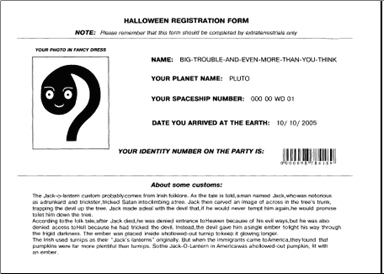
You build a FlexiLayout for a typical single-page registration form. The FlexiLayout detects these elements: **Static Text**, **Character String**, **Barcode**, **Paragraph**, **Date**, **Separator**, and **Object Collection**.
## Fields the FlexiLayout must locate
The FlexiLayout must locate these fields on all test pages:
* **NAME**
* **YOUR PLANET NAME**
* **YOUR SPACESHIP NUMBER**
* **DATE YOU ARRIVED AT THE EARTH**
* **YOUR IDENTITY NUMBER ON THE PARTY**
* **YOUR PHOTO IN FANCY DRESS**
It must also find a text field with the Halloween information the guest entered. Unlike the other fields, you do not know this field's exact name in advance.