> ## Documentation Index
> Fetch the complete documentation index at: https://docs.abbyy.com/llms.txt
> Use this file to discover all available pages before exploring further.
# Sample 2. Step 7: Test the identifier element
> Test the FormHeader identifier element by matching the FlexiLayout with each image, and then add a NearestY pre-search constraint to rule out false matches.
Check whether FlexiLayout Studio detects the **FormHeader** identifier element reliably, and rule out any false matches.
## Match the FlexiLayout with each image
Open the sample images in the batch one at a time.
Select the **Match** command on the **FlexiLayout** menu or the shortcut menu of the image.
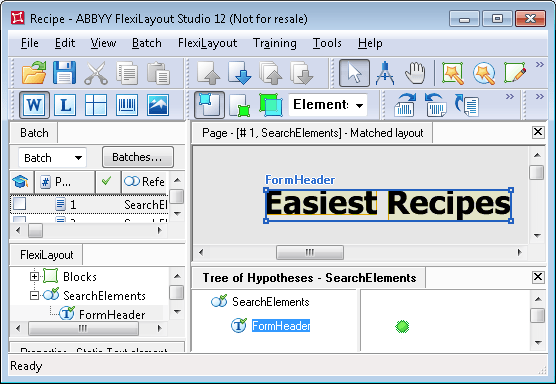
When the image and its FlexiLayout match successfully, FlexiLayout Studio marks the hypothesis it formulates about the **FormHeader** element with  in the **Tree of Hypotheses**.
Click the hypothesis. FlexiLayout Studio draws a blue frame around the detected element, and the hypothesis properties appear in the **Properties** window.
in the **Tree of Hypotheses**.
Click the hypothesis. FlexiLayout Studio draws a blue frame around the detected element, and the hypothesis properties appear in the **Properties** window.
 ## Rule out the phrase above the heading
On some images, FlexiLayout Studio finds part of the phrase above the document heading instead of the heading itself. The phrase "Enjoy our collection of easiest recipes from over 50 countries of the world" appears on almost all the images in the batch.
To prevent FlexiLayout Studio from mistaking this phrase for the document heading, adjust the properties of the identifier element. The phrase always appears above the document heading, so FlexiLayout Studio must look for the object that has all the element's properties and is closest to the bottom edge of the image.
Open the **Properties** dialog box for the **FormHeader** element, and then click the **Advanced** tab.
In the **Advanced pre-search relations** field, specify an [additional search constraint](/flexi-capture/fls/template/advanced-constraints) that looks for the object closest to the bottom edge of the image. In the [FlexiLayout language](/flexi-capture/fls/code/general-code), enter `NearestY: PageRect.Bottom;`.
You can also specify this constraint via the graphical user interface. Click the **Relations** tab, select **Nearest**, and in the **To** drop-down list select **Page bottom edge**.
Match the FlexiLayout with the images again. FlexiLayout Studio now reliably detects the document headings described by the **FormHeader** element on all the test images.
## How the Nearest function works
The **Nearest** function tells FlexiLayout Studio to choose, out of several hypotheses for the element, the one nearest to a particular element or point on the image. FlexiLayout Studio measures the distance between element centers, and after the function runs, only one hypothesis remains. It does not consider hypothesis quality, because the choice is made while hypotheses are still being generated.
## Rule out the phrase above the heading
On some images, FlexiLayout Studio finds part of the phrase above the document heading instead of the heading itself. The phrase "Enjoy our collection of easiest recipes from over 50 countries of the world" appears on almost all the images in the batch.
To prevent FlexiLayout Studio from mistaking this phrase for the document heading, adjust the properties of the identifier element. The phrase always appears above the document heading, so FlexiLayout Studio must look for the object that has all the element's properties and is closest to the bottom edge of the image.
Open the **Properties** dialog box for the **FormHeader** element, and then click the **Advanced** tab.
In the **Advanced pre-search relations** field, specify an [additional search constraint](/flexi-capture/fls/template/advanced-constraints) that looks for the object closest to the bottom edge of the image. In the [FlexiLayout language](/flexi-capture/fls/code/general-code), enter `NearestY: PageRect.Bottom;`.
You can also specify this constraint via the graphical user interface. Click the **Relations** tab, select **Nearest**, and in the **To** drop-down list select **Page bottom edge**.
Match the FlexiLayout with the images again. FlexiLayout Studio now reliably detects the document headings described by the **FormHeader** element on all the test images.
## How the Nearest function works
The **Nearest** function tells FlexiLayout Studio to choose, out of several hypotheses for the element, the one nearest to a particular element or point on the image. FlexiLayout Studio measures the distance between element centers, and after the function runs, only one hypothesis remains. It does not consider hypothesis quality, because the choice is made while hypotheses are still being generated.