> ## Documentation Index
> Fetch the complete documentation index at: https://docs.abbyy.com/llms.txt
> Use this file to discover all available pages before exploring further.
# Easiest Recipes
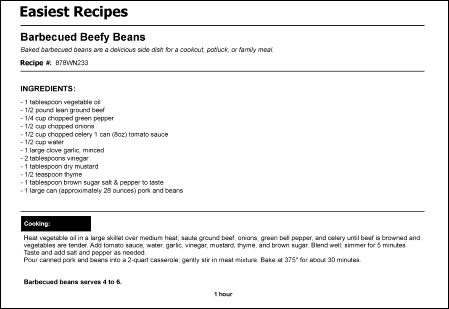
> Overview of the Easiest Recipes sample: build a FlexiLayout that detects recipe name, number, ingredients, cooking time, and description fields.
You build a FlexiLayout for a document with more field types than the Halloween Registration Form, learning techniques for describing the position of objects on the page. For simplicity, the sample uses a one-page document.
The FlexiLayout Studio project with the test images and a ready-made FlexiLayout is located in `%public%\ABBYY\FlexiCapture\12.0\Samples\FLS\English\Recipe`.
The FlexiLayout must reliably detect these fields on all the test pages:
* **Recipe Name**
* **Recipe #**
* **Ingredients**
* **Cooking Time**
* **Cooking Description**