> ## Documentation Index
> Fetch the complete documentation index at: https://docs.abbyy.com/llms.txt
> Use this file to discover all available pages before exploring further.
# Sample 4. Step 5.5: Invoice Date field, grDate, InvoiceDate, and InvoiceDateAsString elements
> Step 5.5 of FlexiLayout Studio Sample 4: capture the Invoice Date field with a grDate group, Date element, and Character String fallback for poor scans.
When you examine the images, you will notice the following:
* On some documents, the **Invoice Date** field appears to the right of the field name; on others, beneath the name. Limit the search area to rectangles to the right of and beneath the name.
* Use a **Date** element to search for the date. Additionally, if the field name is not detected, do not search for the field data.
* Dates are often recognized unreliably, because of scanning defects, invalid date formats, and so on. Specify an additional Character String element in case the Date element fails to find a date.
To set the properties common to all these elements, create a **Group** element.
## Create the grDate group element
In the **InvoiceHeader** element, create a [Group](/flexi-capture/fls/template/elements-compound) element and name it **grDate**.
Click the **Advanced** tab and specify additional search constraints: limit the search area to an array of rectangles consisting of one rectangle to the right of the field name and one rectangle below the field name with some offset. In the [FlexiLayout language](/flexi-capture/fls/code/general-code):
```text theme={null}
RectArray DataRegion;
Let r1= Rect (kwInvoiceDate.Rect.Right, kwInvoiceDate.Rect.Top -20dt, kwInvoiceDate.Rect.Right + 650dt, kwInvoiceDate.Rect.Bottom + 50dt);
Let r2 = Rect (kwInvoiceDate.Rect.Left - 150dt, kwInvoiceDate.Rect.Bottom, kwInvoiceDate.Rect.Right + 100dt, kwInvoiceDate.Rect.Bottom + 100dt);
DataRegion = RectArray (r1);
DataRegion.Add (r2);
RestrictSearchArea (DataRegion);
```
## Create the InvoiceDate element
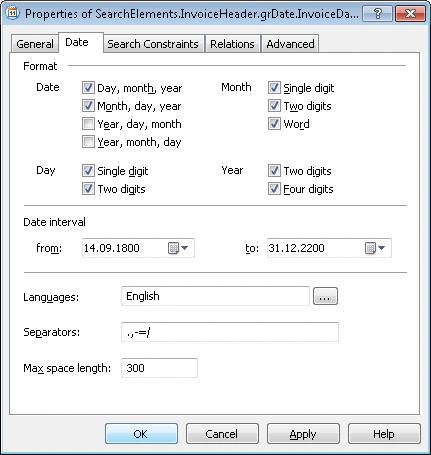
In the `InvoiceHeader.grDate` element, create a [Date](/flexi-capture/fls/template/date) element and name it **InvoiceDate**.
Click the **Date** tab and specify all the possible date formats for the **InvoiceDate** element:
 On some images, the search area for the **Invoice Date** field includes the already detected **kwInvoiceNumber** and **InvoiceNumber** elements. To prevent FlexiLayout Studio from treating their values as hypotheses for the **Invoice Date** field, exclude them from the search area:
* Click **Add...** next to the **Exclude regions of elements** field.
* Select **kwInvoiceNumber** from the list of elements.
* Click **OK**. The string `SearchElements.InvoiceHeader.kwInvoiceNumber` appears in the **Exclude regions of elements** field.
Repeat these actions for the element `SearchElements.InvoiceHeader.InvoiceNumber`.
Click the **Advanced** tab. The **Invoice Date** field is optional. However, when a document contains a date in the **Invoice Date** field, the corresponding field name (described earlier by the **kwInvoiceDate** element) is always present. In **Advanced pre-search relations**, add this condition: search for the image object only if **kwInvoiceDate** was detected. In the [FlexiLayout language](/flexi-capture/fls/code/general-code):
```text theme={null}
If InvoiceHeader.kwInvoiceDate.IsNull
Then DontFind();
```
Temporarily exclude the **InvoiceFooter** element and match the FlexiLayout.
For poor-quality images, when recognition results do not fit any of the standard parameters of the **Date** element, add an alternative element that uses less strict conditions to search for the **Invoice Date** field.
## Create the InvoiceDateAsString element
In the `InvoiceHeader.grDate` element, create a [Character String](/flexi-capture/fls/template/character-chain) element and name it **InvoiceDateAsString**.
Click the **Character String** tab and specify the alphabet:
`,-./0123456789ABCDEFGHIJKLMNOPQRSTUVWXYZ abcdefghijklmnopqrstuvwxyz`
Set the percentage of non-alphabet characters to 30%.
In the **Character count** field, specify the fuzzy interval `{-1, 8, 14, INF}` for the length of the character string, assuming that possible values fall in the range of 8 to 14 characters. Any hypothesis outside this interval is penalized.
Set **Max space length** to 20, which limits the maximum length of a space in the text string to 20 dots. Keep the default settings for the other element properties.
Click the **Advanced** tab. Because the **InvoiceDateAsString** element must be searched for only when the **InvoiceDate** element is not detected, specify this condition in the **Advanced pre-search relations** field. In the [FlexiLayout language](/flexi-capture/fls/code/general-code):
```text theme={null}
If Not InvoiceDate.IsNull Then DontFind;
```
Specify an additional condition, similar to the one for **InvoiceDate**: search for the image object only if the **kwInvoiceDate** element was detected, and search for the object closest to **kwInvoiceDate**. In the [FlexiLayout language](/flexi-capture/fls/code/general-code):
```text theme={null}
If InvoiceHeader.kwInvoiceDate.IsNull Then DontFind;
Nearest: InvoiceHeader.kwInvoiceDate;
```
Specify the location of the **InvoiceDate** block as the rectangular region of the detected **InvoiceDate** or **InvoiceDateAsString** element, increased by 5 dots vertically and horizontally. Select the **Expression** option and type this expression:
```text theme={null}
Rect outputRect;
if not InvoiceHeader.grDate.InvoiceDate.IsNull then
outputRect = InvoiceHeader.grDate.InvoiceDate.Rect;
else
{ outputRect = InvoiceHeader.grDate.InvoiceDateAsString.Rect;
IsNull = InvoiceHeader.grDate.InvoiceDateAsString.IsNull;
}
OutputRegion = outputRect;
OutputRegion.Inflate (5dt, 5dt);
```
On some images, the search area for the **Invoice Date** field includes the already detected **kwInvoiceNumber** and **InvoiceNumber** elements. To prevent FlexiLayout Studio from treating their values as hypotheses for the **Invoice Date** field, exclude them from the search area:
* Click **Add...** next to the **Exclude regions of elements** field.
* Select **kwInvoiceNumber** from the list of elements.
* Click **OK**. The string `SearchElements.InvoiceHeader.kwInvoiceNumber` appears in the **Exclude regions of elements** field.
Repeat these actions for the element `SearchElements.InvoiceHeader.InvoiceNumber`.
Click the **Advanced** tab. The **Invoice Date** field is optional. However, when a document contains a date in the **Invoice Date** field, the corresponding field name (described earlier by the **kwInvoiceDate** element) is always present. In **Advanced pre-search relations**, add this condition: search for the image object only if **kwInvoiceDate** was detected. In the [FlexiLayout language](/flexi-capture/fls/code/general-code):
```text theme={null}
If InvoiceHeader.kwInvoiceDate.IsNull
Then DontFind();
```
Temporarily exclude the **InvoiceFooter** element and match the FlexiLayout.
For poor-quality images, when recognition results do not fit any of the standard parameters of the **Date** element, add an alternative element that uses less strict conditions to search for the **Invoice Date** field.
## Create the InvoiceDateAsString element
In the `InvoiceHeader.grDate` element, create a [Character String](/flexi-capture/fls/template/character-chain) element and name it **InvoiceDateAsString**.
Click the **Character String** tab and specify the alphabet:
`,-./0123456789ABCDEFGHIJKLMNOPQRSTUVWXYZ abcdefghijklmnopqrstuvwxyz`
Set the percentage of non-alphabet characters to 30%.
In the **Character count** field, specify the fuzzy interval `{-1, 8, 14, INF}` for the length of the character string, assuming that possible values fall in the range of 8 to 14 characters. Any hypothesis outside this interval is penalized.
Set **Max space length** to 20, which limits the maximum length of a space in the text string to 20 dots. Keep the default settings for the other element properties.
Click the **Advanced** tab. Because the **InvoiceDateAsString** element must be searched for only when the **InvoiceDate** element is not detected, specify this condition in the **Advanced pre-search relations** field. In the [FlexiLayout language](/flexi-capture/fls/code/general-code):
```text theme={null}
If Not InvoiceDate.IsNull Then DontFind;
```
Specify an additional condition, similar to the one for **InvoiceDate**: search for the image object only if the **kwInvoiceDate** element was detected, and search for the object closest to **kwInvoiceDate**. In the [FlexiLayout language](/flexi-capture/fls/code/general-code):
```text theme={null}
If InvoiceHeader.kwInvoiceDate.IsNull Then DontFind;
Nearest: InvoiceHeader.kwInvoiceDate;
```
Specify the location of the **InvoiceDate** block as the rectangular region of the detected **InvoiceDate** or **InvoiceDateAsString** element, increased by 5 dots vertically and horizontally. Select the **Expression** option and type this expression:
```text theme={null}
Rect outputRect;
if not InvoiceHeader.grDate.InvoiceDate.IsNull then
outputRect = InvoiceHeader.grDate.InvoiceDate.Rect;
else
{ outputRect = InvoiceHeader.grDate.InvoiceDateAsString.Rect;
IsNull = InvoiceHeader.grDate.InvoiceDateAsString.IsNull;
}
OutputRegion = outputRect;
OutputRegion.Inflate (5dt, 5dt);
```