> ## Documentation Index
> Fetch the complete documentation index at: https://docs.abbyy.com/llms.txt
> Use this file to discover all available pages before exploring further.
# Configuring Rules for an Entry Field Element
> Constrain entry field values with Allowed Values and Regular Expression rules set on the Constraints tab of element properties in FormDesigner.
You can impose constraints on admissible values for an entry field element by using rules.
To add a rule, click the Add... button on the Constraints tab of the [element properties](/flexi-capture/form-designer/element-entry-field-edit). In the Validation Rule: Select Rule Definition window that will open, double-click the Create New Rule ... item in the Allowed Values Rule or Regular Expression Rule list to create a new allowed values or regular expression rule. The corresponding dialog box will open.
## Allowed Values Rule
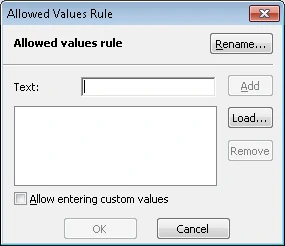 **Rename...** — Click this button to rename the rule. In the dialog box that will open, enter a new name of the rule and click **OK**.
**Text**:
* **Add** — Adds the entered value to the list.
* **Remove** — Removes the selected value from the list.
**Allow entering custom values** — Select this option if you wish to allow entering values which are not in the list. If the option is deselected, you can only select a value from the list.
## Regular Expression Rule
**Rename...** — Click this button to rename the rule. In the dialog box that will open, enter a new name of the rule and click **OK**.
**Text**:
* **Add** — Adds the entered value to the list.
* **Remove** — Removes the selected value from the list.
**Allow entering custom values** — Select this option if you wish to allow entering values which are not in the list. If the option is deselected, you can only select a value from the list.
## Regular Expression Rule
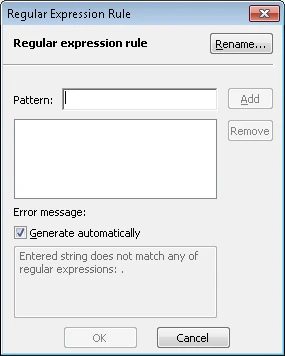 **Rename...** — Click this button to rename the rule. In the dialog box that will open, enter a new name of the rule and click **OK**.
**Pattern**:
* **Add** — Adds the entered regular expression to the list. See also [Alphabet used in regular expressions](/flexi-capture/form-designer/regular-expression).
* **Remove** — Removes the selected expression from the list.
**Error message** — **Generate automatically**: If this option is selected, the text of the error message will be generated automatically. Deselect the option, if you wish to enter a custom text.
**Rename...** — Click this button to rename the rule. In the dialog box that will open, enter a new name of the rule and click **OK**.
**Pattern**:
* **Add** — Adds the entered regular expression to the list. See also [Alphabet used in regular expressions](/flexi-capture/form-designer/regular-expression).
* **Remove** — Removes the selected expression from the list.
**Error message** — **Generate automatically**: If this option is selected, the text of the error message will be generated automatically. Deselect the option, if you wish to enter a custom text.