> ## Documentation Index
> Fetch the complete documentation index at: https://docs.abbyy.com/llms.txt
> Use this file to discover all available pages before exploring further.

# Form Identifiers

> Form identifiers let the processing program recognize a form or page: choose barcode only, barcode with digits, or digits only in ABBYY FormDesigner.

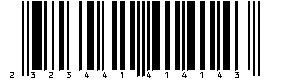
An **identifier** is an element of a machine-readable form that allows the forms processing program to identify the form or one of its pages.

We recommend adding identifiers to your forms. This will help the forms processing program to identify each form as belonging to a given set of forms during processing.

An **identifier** element can identify either an entire form or a particular page on which it is located. You can also specify a custom value for an identifier.

ABBYY FormDesigner can add the following types of form identifier to your forms: **barcode only**, **barcode with digits**, and **digits only**. All these types of identifier are in fact a representation of a unique thirteen-digit number that is given to a form upon publishing. Before you have published a form, the **form identifier** element will have the word "Draft" written over it.

The **barcode only** and **barcode with digits** can be customized by selecting the type of barcode (EAN13 or EAN8).

<table width="100%"><tbody><tr><td><p><strong>Type</strong></p></td><td><p><strong>Description</strong></p></td></tr><tr><td><p><strong>Barcode Only</strong></p><p><img src="https://mintcdn.com/abbyy/8aWHPAJyzWmTqglX/images/flexi-capture/form-designer/Bar_code.gif?s=0be491f1674febcde200f3492c736f56" width="244" height="89" data-path="images/flexi-capture/form-designer/Bar_code.gif" /></p></td><td><p>A barcode will be used to identify the form.</p></td></tr><tr><td><p><strong>Barcode with Digits </strong></p><p><img src="https://mintcdn.com/abbyy/8aWHPAJyzWmTqglX/images/flexi-capture/form-designer/Bar_code_with_Dig.gif?s=fd8e9f0bcc581704b939d68b4d4bb85a" width="283" height="81" data-path="images/flexi-capture/form-designer/Bar_code_with_Dig.gif" /></p></td><td><p>A barcode with digits will be used to identify the form (the digits can be placed either above or below the bars).</p></td></tr><tr><td><p><strong> Digits Only </strong></p><p>1236489271602</p></td><td><p>A thirteen-digit number will be used to identify the form.</p></td></tr></tbody></table>

## Related topics

<CardGroup cols={2}>
  <Card title="Adding an Identifier Element" icon="plus" href="/flexi-capture/form-designer/element-identifier-add" />

  <Card title="Editing an Identifier Element" icon="pen" href="/flexi-capture/form-designer/element-identifier-edit" />

  <Card title="Deleting an Identifier Element" icon="trash" href="/flexi-capture/form-designer/element-identifier-delete" />
</CardGroup>