> ## Documentation Index
> Fetch the complete documentation index at: https://docs.abbyy.com/llms.txt
> Use this file to discover all available pages before exploring further.
# Form properties
> Review form details in the Form Properties dialog box of ABBYY FormDesigner: author, draft or published status, publish date, identifier, and file path.
View the main properties of a form in the **Form Properties** dialog box (**Form → Form Properties...**).
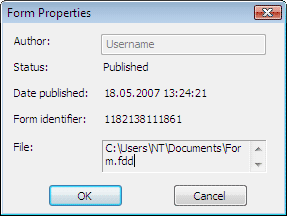 | Property | Description |
| ------------------- | ------------------------------------------------------------------------------------------ |
| **Author** | The name of the person who created the form. |
| **Status** | The form status: **Draft** (changes are allowed) or **Published** (the form is read-only). |
| **Date published** | The date the form was published. |
| **Form identifier** | The value of the form identifier. |
| **File** | The path to the file that contains the form. |
| Property | Description |
| ------------------- | ------------------------------------------------------------------------------------------ |
| **Author** | The name of the person who created the form. |
| **Status** | The form status: **Draft** (changes are allowed) or **Published** (the form is read-only). |
| **Date published** | The date the form was published. |
| **Form identifier** | The value of the form identifier. |
| **File** | The path to the file that contains the form. |