> ## Documentation Index
> Fetch the complete documentation index at: https://docs.abbyy.com/llms.txt
> Use this file to discover all available pages before exploring further.
# ABBYY FlexiCapture のアーキテクチャ
> ABBYY FlexiCapture のアーキテクチャについて説明します。Application Server、License Server、Processing Server、クライアントステーション、コンポーネント間の連携、既定のポートを理解できます。
**ABBYY FlexiCapture** は、文書処理用のステーションとサーバーで構成されるアプリケーション群です。
サーバーコンポーネント:
1. **Application Server** は、Internet Information Services (IIS) 上で動作する Web サービスであり、システム内のすべての HTTP/HTTPS トラフィックの主要なゲートウェイとして機能します。このコンポーネントは、ユーザー認証と認可の機能を提供し、サーバーコンポーネントとクライアントコンポーネント間の通信を可能にします。
2. **License Server** は、現在使用中の License と、システムの利用可能な範囲に関する情報を保存するサービスです。
3. **Processing Server** は、Processing Stations を管理するサービスです。このコンポーネントにより、分散処理が可能になります。
4. **Database** は、処理設定、ユーザー情報、処理中の文書に関する情報、および処理済み文書の統計情報を保存します。
5. **File Storage** は、処理中の文書の画像と、それらの文書から抽出されたデータを保存します。
各サーバーコンポーネントは別々のコンピューターにインストールできるため、柔軟に拡張できるほか、信頼性やセキュリティの設定を個別に行えます。
クライアントコンポーネント:
1. **Administration and Monitoring Console** は、ABBYY FlexiCapture の設定および動作の監視に使用される Web アプリケーションです。
2. **Project Setup Station** は、文書処理の設定に使用されます。
3. **Processing Stations:**
* **Automated Processing Stations** は、画像のインポートと処理、光学認識の実行、ユーザースクリプトの実行、抽出されたデータのユーザーのストレージシステムへのエクスポート、および各種サービス処理を実行します。
* **Manual Processing Stations** (**Scanning Station** および **Verification Station**) は、文書画像を取得し、それらを ABBYY FlexiCapture に取り込み、抽出されたデータを検証するための一連のアプリケーションです。これらは、個別の PC アプリケーション、ブラウザベースのシンクライアント、またはモバイルアプリとしてインストールできます。
## コンポーネント間の連携
以下のフローチャートは、ABBYY FlexiCapture コンポーネント間の連携を示しています。
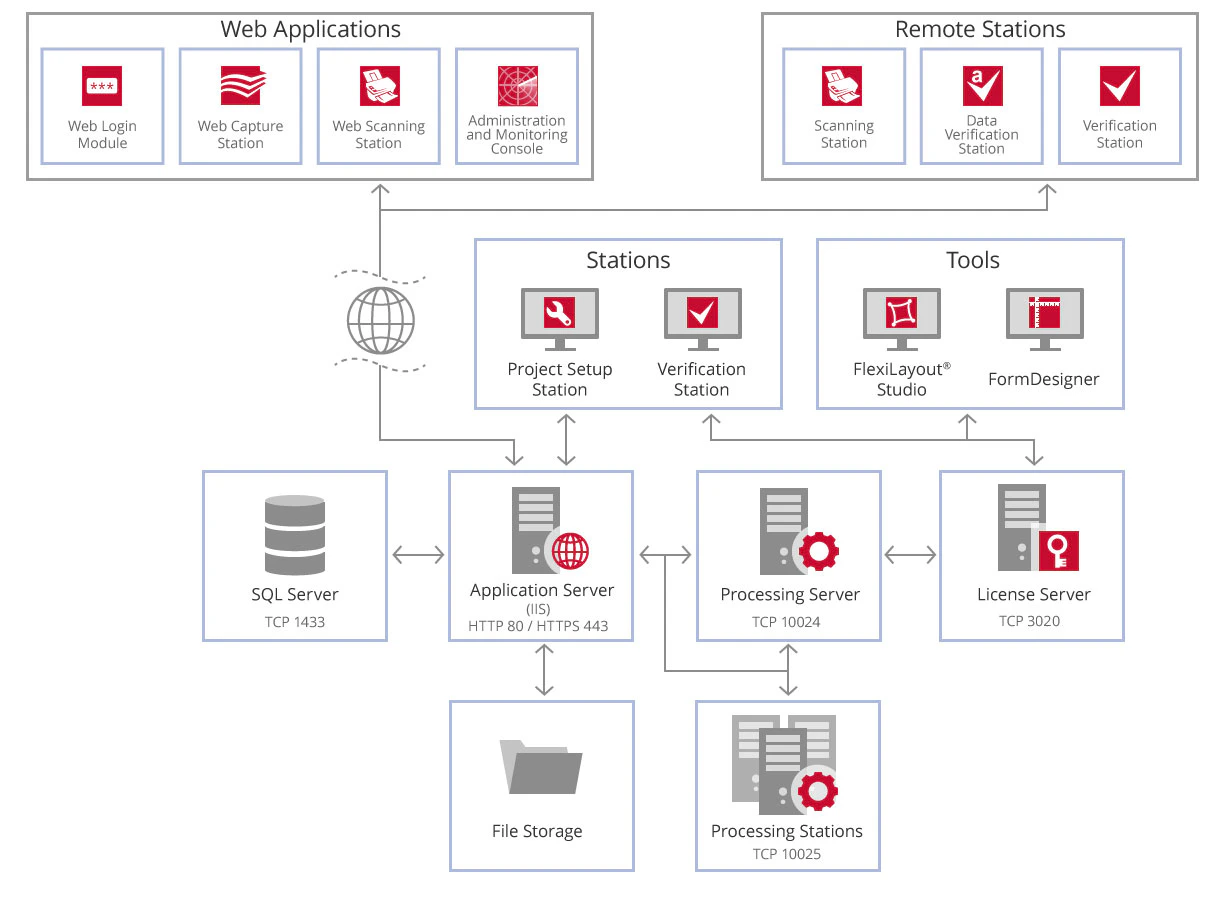 詳細については、[ABBYY FlexiCapture コンポーネント間の連携の概要](https://support.abbyy.com/hc/en-us/articles/360010126899)を参照してください。
デフォルトでは、次のポートとプロトコルが使用されます。
* **Application Server** - 80 (HTTP を使用する場合) または 443 (HTTPS を使用する場合)
* **License Server** - 3020
* **Processing Server** - 10024
* **Processing Stations** - 10025
詳細については、[ABBYY FlexiCapture コンポーネント間の連携の概要](https://support.abbyy.com/hc/en-us/articles/360010126899)を参照してください。
デフォルトでは、次のポートとプロトコルが使用されます。
* **Application Server** - 80 (HTTP を使用する場合) または 443 (HTTPS を使用する場合)
* **License Server** - 3020
* **Processing Server** - 10024
* **Processing Stations** - 10025