> ## Documentation Index
> Fetch the complete documentation index at: https://docs.abbyy.com/llms.txt
> Use this file to discover all available pages before exploring further.
# ABBYY FlexiCapture Cloud のオペレーターワークステーション
> Project Setup や FlexiLayout Studio、Scanning Station、Web Station、Verification Station など、各オペレーターの役割で使用する ABBYY FlexiCapture Cloud コンポーネントを確認します。
一般的なデータ抽出プロジェクトでは、複数のオペレーターが関与し、それぞれが特定の種類の操作を担当します。以下の図は、各オペレーターが利用できる ABBYY FlexiCapture コンポーネントを示しています。
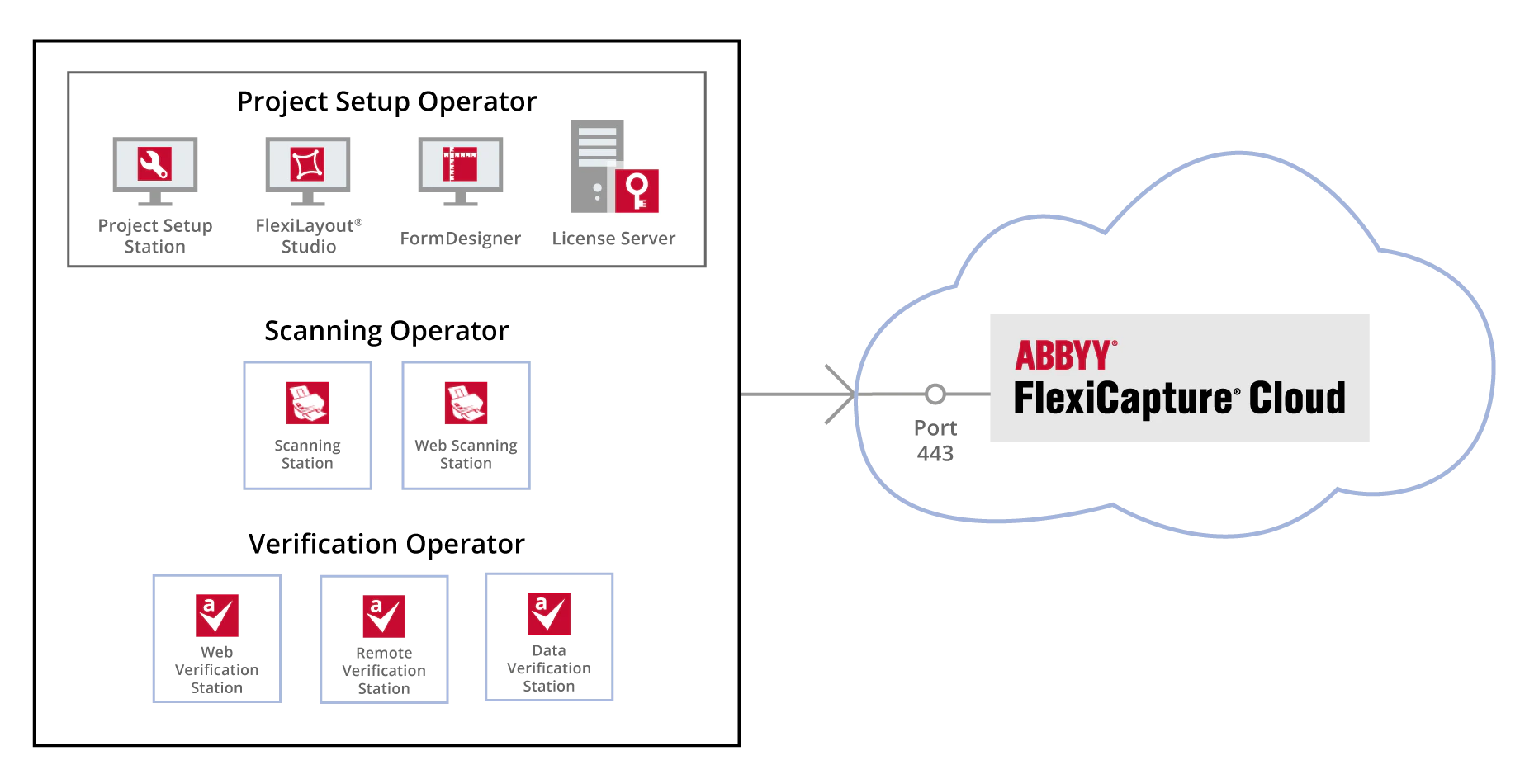 利用できるオペレーターステーションの種類と、同時に使用できる数は、Cloud License によって決まります ([ABBYY FlexiCapture Cloud Licensing](/ja/flexi-capture/cloud-licensing) を参照) 。
## Project Setup Operatorの作業環境
Project Setup Operatorは、次のコンポーネントを使用します。
* [Project Setup Station](/ja/flexi-capture/architecture/setup-proj-station) (データ抽出プロジェクトの設定や変更に使用)
* [ABBYY FlexiLayout Studio](/ja/flexi-capture/fls/overview/about) (半構造化文書からデータを抽出するための定義を作成する際に使用)
* [ABBYY FormDesigner](/ja/flexi-capture/form-designer/about-program) (ABBYY FlexiCapture で簡単に処理できる機械可読フォームの作成に使用)
* [Licensing Server](/ja/flexi-capture/architecture/lic-server) (ライセンスの管理に使用)
これらのコンポーネントはすべて ABBYY FlexiCapture Developer's Package と一緒にインストールされ、Developer’s Package License が必要です ([ABBYY FlexiCapture Cloud Licensing](/ja/flexi-capture/cloud-licensing) を参照) 。
## スキャンオペレーターの作業環境
スキャンオペレーターは、次のいずれかのコンポーネントを使用してドキュメントをスキャンします。
* [Scanning Station](/ja/flexi-capture/architecture/scan-station) (ローカルにインストールして使用するコンポーネントです)
* [Web Scanning Station](/ja/flexi-capture/architecture/web-scanning-station) (ブラウザーウィンドウからアクセスできるコンポーネントです)
Scanning Station コンポーネントは、[https://www.abbyy.com/flexicapture-downloads/cloud/](https://www.abbyy.com/flexicapture-downloads/cloud/) からダウンロードできます。
## 検証オペレーターの作業環境
検証オペレーターは、次のいずれかのコンポーネントを使用して、抽出されたデータを検証します。
* [Data Verification Station](/ja/flexi-capture/architecture/data-ver-station-architecture) (簡易的なデータチェックに使用する、ローカルにインストールされるコンポーネント)
* [Remote Verification Station](/ja/flexi-capture/architecture/remote-ver-station) (複雑なデータチェックに使用する、ローカルにインストールされるコンポーネント)
* [Web Verification Station](/ja/flexi-capture/architecture/web-verification-station) (ブラウザーからアクセスでき、複雑なデータチェックに使用するコンポーネント)
Data Verification Station コンポーネントは、次の場所からダウンロードできます。[https://www.abbyy.com/flexicapture-downloads/cloud/](https://www.abbyy.com/flexicapture-downloads/cloud/)。