> ## Documentation Index
> Fetch the complete documentation index at: https://docs.abbyy.com/llms.txt
> Use this file to discover all available pages before exploring further.
# FlexiLayout ウィンドウ
> Blocks および SearchElements のブランチで構成される FlexiLayout ウィンドウのツリーをたどり、ABBYY FlexiLayout Studio でドラッグして要素やブロックを移動またはコピーします。
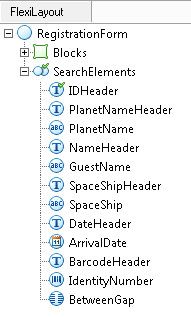
**FlexiLayout ウィンドウ**には、現在の FlexiLayout のツリー図が表示されます。
## FlexiLayout tree のブランチ
このツリーには、次のブランチがあります。
* **Blocks** – FlexiLayout の[ブロック](/ja/flexi-capture/fls/template/blocks)が含まれます。
* **SearchElements** – [要素](/ja/flexi-capture/fls/template/elements)が含まれます。1 つのツリーに複数の **SearchElements** ブランチを含めることができ、それぞれが 1 つの代替レイアウトに対応します。
ブロックと要素はグループ化して、新しいネストレベルを形成できます。
## 要素とブロックの移動とコピー
ツリー内の要素とブロックは、移動やコピーができます。
* 要素またはブロックを移動するには、新しい位置へドラッグします。
* 要素またはブロックをコピーするには、**Ctrl** キーを押しながらドラッグします。