> ## Documentation Index
> Fetch the complete documentation index at: https://docs.abbyy.com/llms.txt
> Use this file to discover all available pages before exploring further.
# 繰り返しグループ要素の追加の検索制約
> FlexiLayout Studio で、繰り返しグループ要素に対する追加の検索制約を設定します。これには、MinRepetitions の制限や LastFound によるインスタンスへのアクセスが含まれます。
**繰り返しグループ** 要素の **Properties** ダイアログには、追加の検索制約を指定できる 2 つのタブがあります。**Advanced** と **Advanced for All Instances** です。**Advanced** タブでは、グループの個々のインスタンスに対する追加の検索制約を指定できます。**Advanced for All Instances** タブでは、グループのすべてのインスタンスに対する追加の検索制約を指定できます。
## Advanced タブと Advanced for All Instances タブ
**Properties** ダイアログを開くには、**FlexiLayout** ウィンドウで **繰り返しグループ** 要素を右クリックし、ショートカットメニューから **Properties...** を選択します。
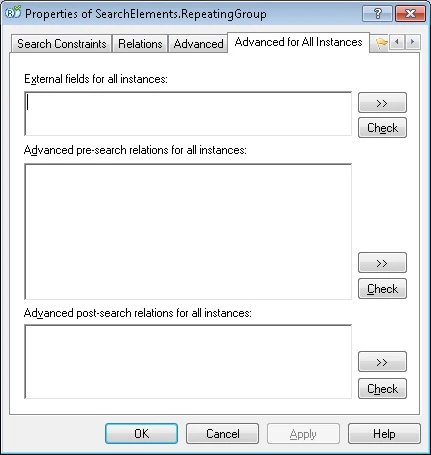 External fields for All Instances セクションでは、Group 要素で使用できるすべてのメソッドを利用できます。たとえば、すでに検出されたインスタンスとのリレーションを指定できます。
```text theme={null}
// 後続の各インスタンスは、前のインスタンスの下に配置されます
if SearchElements.RepeatingGroup.HasInstances then {
Below: SearchElements.RepeatingGroup.LastFound, 0 * dot;
}
```
**Advanced pre-search relations for all instances** セクションでは、次のメソッドを使用できます。
* **MinRepetitions**
* **MaxRepetitions**
* **PaginalMode**
* **MinRepetitionsOnPage**
* **MaxRepetitionsOnPage**
**Post-search relations** セクションでは、特定のインスタンスの推定値を指定できます。**Post-search relations for all instances** セクションでは、検出されたすべてのインスタンスの推定値を指定できます。
**Pre-search relations** セクションでは、**Group** 要素で使用できるすべてのメソッドを使用できます。
**Post-search relations** セクションのコード例:
```text theme={null}
// 繰り返しグループ内のサブ要素である StaticText1 と StaticText2 の仮説を確認します。最後に検出されたインスタンスが使用されます。
if StaticText1.Width() < 200dt and StaticText2.Width() < 200dt then Quality: 0.98;
```
**Post-search relations for all instances** セクションのコード例:
```text theme={null}
if InstancesCount() < 5 and LastFound.Pages.End <= 2 then Quality: 0.98;
```
External fields for All Instances セクションでは、Group 要素で使用できるすべてのメソッドを利用できます。たとえば、すでに検出されたインスタンスとのリレーションを指定できます。
```text theme={null}
// 後続の各インスタンスは、前のインスタンスの下に配置されます
if SearchElements.RepeatingGroup.HasInstances then {
Below: SearchElements.RepeatingGroup.LastFound, 0 * dot;
}
```
**Advanced pre-search relations for all instances** セクションでは、次のメソッドを使用できます。
* **MinRepetitions**
* **MaxRepetitions**
* **PaginalMode**
* **MinRepetitionsOnPage**
* **MaxRepetitionsOnPage**
**Post-search relations** セクションでは、特定のインスタンスの推定値を指定できます。**Post-search relations for all instances** セクションでは、検出されたすべてのインスタンスの推定値を指定できます。
**Pre-search relations** セクションでは、**Group** 要素で使用できるすべてのメソッドを使用できます。
**Post-search relations** セクションのコード例:
```text theme={null}
// 繰り返しグループ内のサブ要素である StaticText1 と StaticText2 の仮説を確認します。最後に検出されたインスタンスが使用されます。
if StaticText1.Width() < 200dt and StaticText2.Width() < 200dt then Quality: 0.98;
```
**Post-search relations for all instances** セクションのコード例:
```text theme={null}
if InstancesCount() < 5 and LastFound.Pages.End <= 2 then Quality: 0.98;
```
## 要素インスタンスへのアクセス
要素インスタンスにアクセスするには、次の定義済み名を使用します。
| 名前 | 説明 |
| ------------------- | --------------------------- |
| **LastFound** | 最後に検出されたインスタンス。 |
| **CurrentInstance** | 繰り返し要素内を検索しているときの現在のインスタンス。 |
| **Instance(n)** | `n` 番目のインスタンス。 |
| **AllInstances** | すべてのインスタンス。 |
**繰り返しグループ** 要素のサブ要素には、それらが要素ツリー内のより下位にある場合でもアクセスできます。
要素インスタンスを操作するには、FlexiLayout language の次のメソッドも使用できます。
* **HasInstances** – すでにインスタンスが見つかっているかどうかを確認します。
* **InstancesCount** – 検出されたインスタンス数を返します。
## 要素インスタンスの検索停止条件
インスタンスの検索は、プログラムがグループの空の仮説 (つまり、空の Region を持つグループ) に遭遇した場合、またはそれ以上仮説を生成できなくなった場合 (検索領域内に仮説がもう存在しない場合) に、指定されたブランチで停止します。
Paginal モードでは、このルールは1ページ内の検索にのみ適用されます。プログラムは1ページの検索を完了すると、次のページに進みます。
**MinRepetitionsOnPage**、**MaxRepetitionsOnPage**、**MinRepetitions**、**MaxRepetitions** も、仮説の生成プロセスに影響します。
標準の仮説生成プロセスを変更するには、次のメソッドを使用できます。
| 目的 | 条件 | 入力場所 |
| ------------------------------------------------------------------------------------------------- | ------------------------------------------------------------------ | ---------------------------------- |
| 最後に検出されたインスタンスを最終のインスタンスにする | `if SearchElements.RepeatingGroup.HasInstances and then DontFind;` | **Advanced pre-search relations** |
| 他に良好なインスタンスが検出されなかった場合に、最後に検出されたインスタンス (この制約を作成している対象) を「bad」としてマークし、1つ前のインスタンスが最終のインスタンスになるようにする | `If then Quality: 0;` | **Advanced post-search relations** |
## 関連トピック
* [FlexiLayout language](/ja/flexi-capture/fls/code/general-code)