 で示されます。
必要に応じて、**ラベル付き field** 要素はグループとして表すことができます。
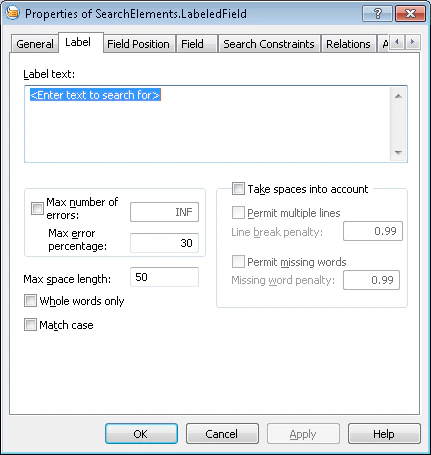
field の名前を検索する際、プログラムは、[プレ認識](/ja/flexi-capture/fls/batch/prerecognition) によって検出され、要素の検索領域内にある **Recognized Lines** オブジェクトと **認識済みの単語** オブジェクトを考慮します。field の名前が検出されると、プログラムは、その要素で指定された記述に内容が一致する field を検索します。
で示されます。
必要に応じて、**ラベル付き field** 要素はグループとして表すことができます。
field の名前を検索する際、プログラムは、[プレ認識](/ja/flexi-capture/fls/batch/prerecognition) によって検出され、要素の検索領域内にある **Recognized Lines** オブジェクトと **認識済みの単語** オブジェクトを考慮します。field の名前が検出されると、プログラムは、その要素で指定された記述に内容が一致する field を検索します。
 ### 名前に対する field の位置
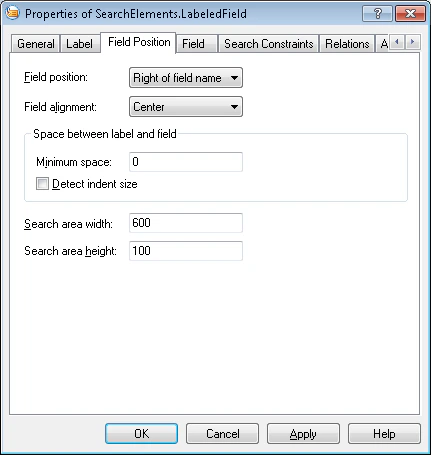
field の名前に対する位置は、**Field Position** タブで指定します。
### 名前に対する field の位置
field の名前に対する位置は、**Field Position** タブで指定します。
 | Property | Description |
| ---------------------- | ------------------------------------- |
| **Field Position** | 名前に対する field の位置 (右、左、上、下) を指定します。 |
| **Minimum space** | 名前と field の間の最小間隔を指定します (ユーザー定義の単位) 。 |
| **Search area width** | 検索領域の幅を指定します (ユーザー定義の単位) 。 |
| **Search area height** | 検索領域の高さを指定します (ユーザー定義の単位) 。 |
**Field alignment** は、名前を囲む Rectangle に対する field の検索領域の配置を指定します。設定できる値は、**Field Position** field の値によって異なります。
* field が名前の右または左に配置されている場合、検索領域は上側または下側の境界に揃えるか、中央に配置できます。
* field が名前の上または下に配置されている場合、検索領域は左側または右側の境界に揃えるか、中央に配置できます。
**Detect indent size** は、field とその名前の間の距離を検出するために [White Gap](/ja/flexi-capture/fls/template/white-gap) 要素を使用するかどうかを指定するフラグです。
このオプションをオフにすると、距離の検索領域は **Minimum space** field で指定した値から始まります。オンにすると、この距離から始まる補助の [White Gap](/ja/flexi-capture/fls/template/white-gap) 要素が生成され、検索領域はこの要素の後から始まります。
### field の検索条件
field の検索条件は、**Field** タブで指定します。
| Property | Description |
| ---------------------- | ------------------------------------- |
| **Field Position** | 名前に対する field の位置 (右、左、上、下) を指定します。 |
| **Minimum space** | 名前と field の間の最小間隔を指定します (ユーザー定義の単位) 。 |
| **Search area width** | 検索領域の幅を指定します (ユーザー定義の単位) 。 |
| **Search area height** | 検索領域の高さを指定します (ユーザー定義の単位) 。 |
**Field alignment** は、名前を囲む Rectangle に対する field の検索領域の配置を指定します。設定できる値は、**Field Position** field の値によって異なります。
* field が名前の右または左に配置されている場合、検索領域は上側または下側の境界に揃えるか、中央に配置できます。
* field が名前の上または下に配置されている場合、検索領域は左側または右側の境界に揃えるか、中央に配置できます。
**Detect indent size** は、field とその名前の間の距離を検出するために [White Gap](/ja/flexi-capture/fls/template/white-gap) 要素を使用するかどうかを指定するフラグです。
このオプションをオフにすると、距離の検索領域は **Minimum space** field で指定した値から始まります。オンにすると、この距離から始まる補助の [White Gap](/ja/flexi-capture/fls/template/white-gap) 要素が生成され、検索領域はこの要素の後から始まります。
### field の検索条件
field の検索条件は、**Field** タブで指定します。
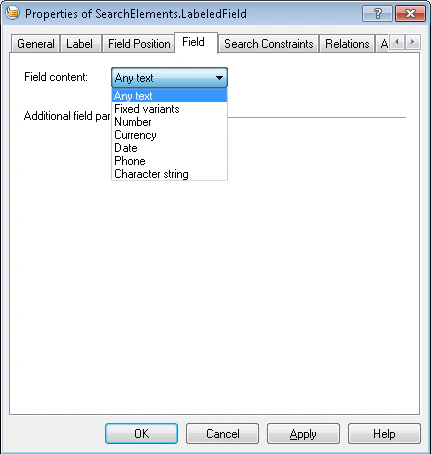 **Field Content** では、field の内容の型を指定します。
field の型に応じて、**Field** タブには追加の検索条件を設定できます。
| Field Content の型 | 追加の制約 |
| -------------------- | ----------------------------------------------------------------------------------------------------------------------------------------------------------------------------------------------------------------------- |
| **Fixed variants** | [Static Text](/ja/flexi-capture/fls/template/static-text) 型と同じで、プロパティも同一です。 |
| **Number** | **Value interval** — 可能な値の範囲です。-2147483648 から 2147483647 までです。**Signs and Separators** — **Take sign into account** (数値に符号を含めることができます) および **Can be fractional** (数値に小数部を含めることができます) です。 |
| **Currency** | **Currency names** — [Currency](/ja/flexi-capture/fls/template/currency) 型の同名のプロパティと同じです。 |
| **Date** | [Date](/ja/flexi-capture/fls/template/date) 型と同じで、プロパティも同一です。 |
| **Phone** | **Min number of digits** と **Max number of digits** — [Phone](/ja/flexi-capture/fls/template/phone) 型の同名のプロパティと同じです。 |
| **Character String** | **Alphabet** — 使用可能な文字のセットです ([Character String](/ja/flexi-capture/fls/template/character-chain) 型と同じです) 。**Regular expression** — 検索パターンです (Character String 型と同じです) 。**Min length** と **Max length** — 文字列の最小長と最大長です。 |
* [要素の作成、コピー、削除](/ja/flexi-capture/fls/template/elements-simple)
* [要素のプロパティの概要](/ja/flexi-capture/fls/template/elements-properties)
* [検索領域](/ja/flexi-capture/fls/template/search-constraints)
* [ラベル付き field](/ja/flexi-capture/fls/language/labeled-field-language)
**Field Content** では、field の内容の型を指定します。
field の型に応じて、**Field** タブには追加の検索条件を設定できます。
| Field Content の型 | 追加の制約 |
| -------------------- | ----------------------------------------------------------------------------------------------------------------------------------------------------------------------------------------------------------------------- |
| **Fixed variants** | [Static Text](/ja/flexi-capture/fls/template/static-text) 型と同じで、プロパティも同一です。 |
| **Number** | **Value interval** — 可能な値の範囲です。-2147483648 から 2147483647 までです。**Signs and Separators** — **Take sign into account** (数値に符号を含めることができます) および **Can be fractional** (数値に小数部を含めることができます) です。 |
| **Currency** | **Currency names** — [Currency](/ja/flexi-capture/fls/template/currency) 型の同名のプロパティと同じです。 |
| **Date** | [Date](/ja/flexi-capture/fls/template/date) 型と同じで、プロパティも同一です。 |
| **Phone** | **Min number of digits** と **Max number of digits** — [Phone](/ja/flexi-capture/fls/template/phone) 型の同名のプロパティと同じです。 |
| **Character String** | **Alphabet** — 使用可能な文字のセットです ([Character String](/ja/flexi-capture/fls/template/character-chain) 型と同じです) 。**Regular expression** — 検索パターンです (Character String 型と同じです) 。**Min length** と **Max length** — 文字列の最小長と最大長です。 |
* [要素の作成、コピー、削除](/ja/flexi-capture/fls/template/elements-simple)
* [要素のプロパティの概要](/ja/flexi-capture/fls/template/elements-properties)
* [検索領域](/ja/flexi-capture/fls/template/search-constraints)
* [ラベル付き field](/ja/flexi-capture/fls/language/labeled-field-language)