> ## Documentation Index
> Fetch the complete documentation index at: https://docs.abbyy.com/llms.txt
> Use this file to discover all available pages before exploring further.
# サンプル 1. はじめに
> FlexiLayout Studio サンプル 1 の概要: 名前、日付、バーコード、写真の field を特定するハロウィーン登録フォーム用の FlexiLayout を作成します。
簡単にするため、このサンプルでは1ページの文書を使用します。
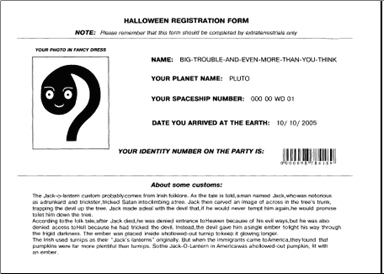
このサンプル文書は、FlexiLayout を作成する必要がある登録フォームの典型例です。ここでは、**Static Text**、**Character String**、**Barcode**、**Paragraph**、**Date**、**Separator**、**Object Collection** という要素を検出する FlexiLayout を作成するために必要なすべての手順を見ていきます。
最終的な目標は、ABBYY FlexiCapture がすべてのテストページ上で次の field を見つけられるようにする FlexiLayout を作成することです。
* **氏名**
* **あなたの惑星名**
* **あなたの宇宙船番号**
* **地球に到着した日付**
* **パーティーでのあなたの身分証番号**
* **仮装したあなたの写真**
さらに、FlexiLayout では、ゲストがハロウィーンについて調べてわかった情報を入力した Text field を、FlexiCapture が見つけられるようにする必要があります。ほかの field とは異なり、この field の正確な名前は事前にはわかりません。
次の画像は、サンプルの登録フォームを示しています。