> ## Documentation Index
> Fetch the complete documentation index at: https://docs.abbyy.com/llms.txt
> Use this file to discover all available pages before exploring further.
# 簡単レシピ
> 簡単レシピのサンプルの概要:レシピ名、番号、材料、調理時間、説明の各フィールドを検出する FlexiLayout を作成します。
簡単にするため、このサンプルでは1ページの文書を使用しています。
このサンプルでは、Halloween Registration Form よりも多くの種類のフィールドを持つ文書用の FlexiLayout を作成する方法を説明します。このサンプルは、FlexiLayout 作成のすべての手順を一通り学ぶのに役立つだけでなく、文書画像上のオブジェクトの位置を記述する際に使えるいくつかのテクニックも紹介します。
テスト画像と完成済みの FlexiLayout を含む FlexiLayout Studio プロジェクトは、`%public%\ABBYY\FlexiCapture\12.0\Samples\FLS\English\Recipe` にあります。
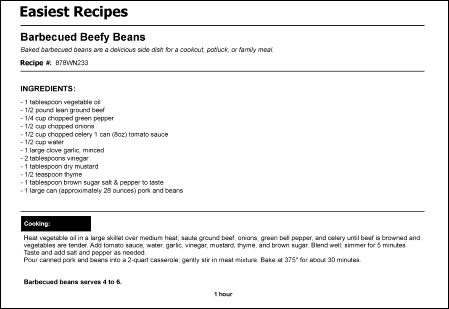
FlexiLayout は、すべてのテストページで次のフィールドを確実に検出する必要があります。
* **レシピ名**
* **レシピ #**
* **材料**
* **調理時間**
* **調理手順**
次の画像は、FlexiLayout が検出する必要があるフィールドを示したサンプルのレシピ文書です。