> ## Documentation Index
> Fetch the complete documentation index at: https://docs.abbyy.com/llms.txt
> Use this file to discover all available pages before exploring further.
# サンプル 3. ステップ 3: ブロック
> invoice サンプルのブロックを作成します。具体的には、6 つの Text ブロックと、名前付きカラムを持つ InvoiceTable テーブルブロックを、FlexiLayout 要素を記述する前に作成します。
FlexiLayout 作成の主な目的は、次のブロックを確実に検出することです (画像上に存在する場合) 。
* **請求書番号**
* **請求日**
* **配送先住所**
* **合計数量**
* **合計金額**
* **国**
* **請求書テーブル** (対象となるカラムは次のもののみ: **Reference**、**Designation**、**Quantity**、**Unit Price**、**Total**)
まずこれらのブロックを作成し、FlexiLayout の作成時にその一覧を利用できるようにします。
1. field **請求書番号** に対応する、型 [Text](/ja/flexi-capture/fls/template/blocks) のブロック **InvoiceNumber** を作成します。
2. field **請求日** に対応する、型 [Text](/ja/flexi-capture/fls/template/blocks) のブロック **InvoiceDate** を作成します。
3. field **配送先住所** に対応する、型 [Text](/ja/flexi-capture/fls/template/blocks) のブロック **DeliveryAddress** を作成します。
4. field **合計数量** に対応する、型 [Text](/ja/flexi-capture/fls/template/blocks) のブロック **TotalQuantity** を作成します。
5. field **合計金額** に対応する、型 [Text](/ja/flexi-capture/fls/template/blocks) のブロック **TotalAmount** を作成します。
6. field **国** に対応する、型 [Text](/ja/flexi-capture/fls/template/blocks) のブロック **Country** を作成します。
7. field **請求書テーブル** に対応する、型 [Table](/ja/flexi-capture/fls/tables/general-tables) のブロック **InvoiceTable** を作成します。ブロックの **Properties** ダイアログで **Columns** タブをクリックし、カラム名を入力してその順序を指定します。この順序は、後で FlexiCapture の Document Definition で使用されます。カラム名は次の順に追加します: **Reference**、**Designation**、**Quantity**、**UnitPrice**、**Total**。詳細は [テーブルブロック](/ja/flexi-capture/fls/tables/table-block) を参照してください。
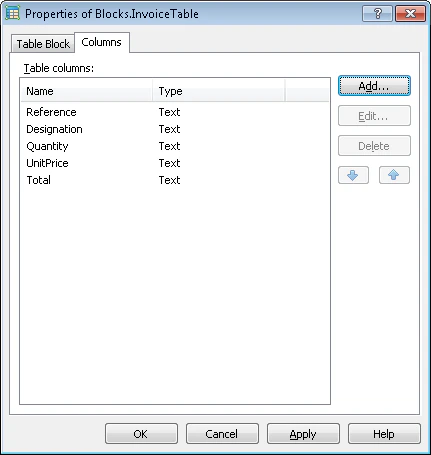 この段階では、ブロックの型と名前 (および [Table](/ja/flexi-capture/fls/tables/general-tables) ブロックについてはカラムの順序) のみを指定します。各ブロックの位置は、すべての補助要素の記述とデバッグが完了した後で指定します。[Table](/ja/flexi-capture/fls/tables/general-tables) 型のブロックは、そのブロックを検索するために使用される [Table](/ja/flexi-capture/fls/tables/general-tables) 型の要素より前に作成しておくことが非常に重要です。これは、Table 要素が Table ブロックへの参照を保持している必要があるためです。この要件により、[Table](/ja/flexi-capture/fls/tables/general-tables) ブロックは、[Text](/ja/flexi-capture/fls/template/blocks)、[Barcode](/ja/flexi-capture/fls/template/blocks)、[Checkmark](/ja/flexi-capture/fls/template/blocks)、[Picture](/ja/flexi-capture/fls/template/blocks) 型のブロックとは異なります。これらのブロックは、各ブロック用の要素をすべて作成した後で、FlexiLayout を修正する際に作成できます (たとえば、[Tutorial 1](/ja/flexi-capture/fls/tutorial/tutorial-general) と [Tutorial 2](/ja/flexi-capture/fls/tutorial2/tutorial2-general) を参照してください) 。
これで事前設定が完了したので、要素の作成を始められます。
この段階では、ブロックの型と名前 (および [Table](/ja/flexi-capture/fls/tables/general-tables) ブロックについてはカラムの順序) のみを指定します。各ブロックの位置は、すべての補助要素の記述とデバッグが完了した後で指定します。[Table](/ja/flexi-capture/fls/tables/general-tables) 型のブロックは、そのブロックを検索するために使用される [Table](/ja/flexi-capture/fls/tables/general-tables) 型の要素より前に作成しておくことが非常に重要です。これは、Table 要素が Table ブロックへの参照を保持している必要があるためです。この要件により、[Table](/ja/flexi-capture/fls/tables/general-tables) ブロックは、[Text](/ja/flexi-capture/fls/template/blocks)、[Barcode](/ja/flexi-capture/fls/template/blocks)、[Checkmark](/ja/flexi-capture/fls/template/blocks)、[Picture](/ja/flexi-capture/fls/template/blocks) 型のブロックとは異なります。これらのブロックは、各ブロック用の要素をすべて作成した後で、FlexiLayout を修正する際に作成できます (たとえば、[Tutorial 1](/ja/flexi-capture/fls/tutorial/tutorial-general) と [Tutorial 2](/ja/flexi-capture/fls/tutorial2/tutorial2-general) を参照してください) 。
これで事前設定が完了したので、要素の作成を始められます。