> ## Documentation Index
> Fetch the complete documentation index at: https://docs.abbyy.com/llms.txt
> Use this file to discover all available pages before exploring further.
# 請求書の取り込み方法
> ABBYY FlexiCapture for Invoices における請求書取り込みワークフローの概要。画像の追加と認識、検証、エクスポートの各手順へのリンクを含みます。
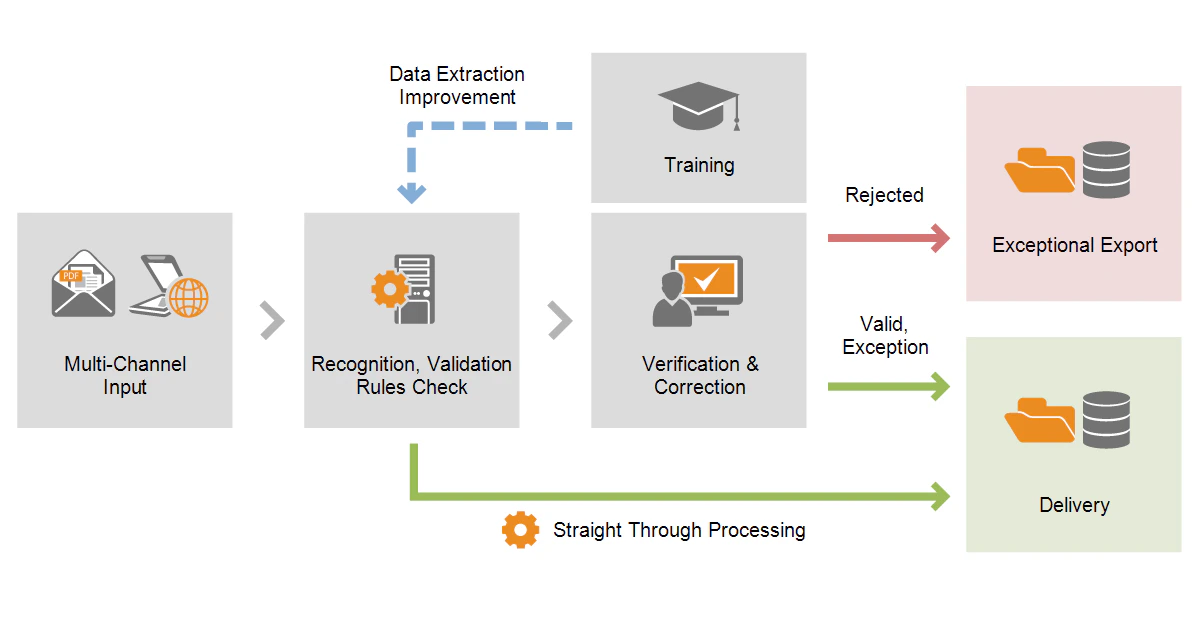 請求書の取り込みは、次の手順で行います。
* [画像の追加と認識](/ja/flexi-capture/invoice-reader/ir-image-adding-and-recognition)
* [検証](/ja/flexi-capture/invoice-reader/ir-verification) と [エラーの修正](/ja/flexi-capture/invoice-reader/ir-correcting)
* [検証済みデータのエクスポート](/ja/flexi-capture/invoice-reader/ir-data-export)
請求書の取り込みは、次の手順で行います。
* [画像の追加と認識](/ja/flexi-capture/invoice-reader/ir-image-adding-and-recognition)
* [検証](/ja/flexi-capture/invoice-reader/ir-verification) と [エラーの修正](/ja/flexi-capture/invoice-reader/ir-correcting)
* [検証済みデータのエクスポート](/ja/flexi-capture/invoice-reader/ir-data-export)