> ## Documentation Index
> Fetch the complete documentation index at: https://docs.abbyy.com/llms.txt
> Use this file to discover all available pages before exploring further.
# FlexiCapture Cloud REST API のWebポータル
> FlexiCapture Cloud REST API のWebポータルの各ビュー(Document Capture、Processing and Usage Reports、Applications、Quick Start Guide、API Description)を紹介します。
FlexiCapture Cloud REST API のWebポータルは、REST API と、それを使用したドキュメントの処理、処理のテスト、アプリケーションの管理方法を理解するために用意されています。
適切なプラットフォームを選択し、[https://flexicapture.com/](https://flexicapture.com) でサービスに登録できます。
## FlexiCapture Cloud REST API のWebポータルの機能概要
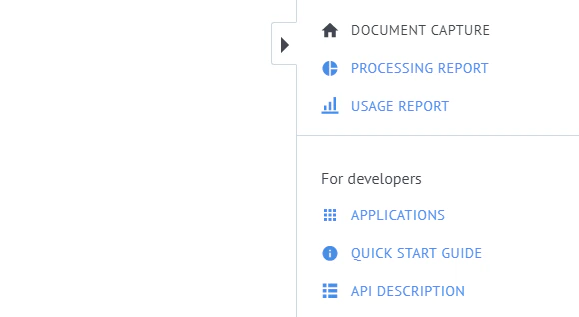 Webポータルでは、次のビューが提供されています。
**Document Capture** — 文書をアップロードして処理し、その後処理結果をダウンロードすることで、文書処理をテストできます。
**Processing Report** — 特定の期間におけるページ処理の統計情報 (正常に処理されたページ数や、エラーが発生したページ数など) が表示されます。
**Usage Report** — 一定期間内にアプリケーションで処理されたページ数と文書数の合計が表示されます。
**Applications** — 利用可能なアプリケーションの確認、アプリケーションのアクティブ化、新しいアプリケーションの作成を行えます。
**Quick Start Guide** — 主な文書処理シナリオを対話形式で案内します。ファイルのアップロード、ファイルを処理するタスクの作成、タスクのステータスの確認、処理結果の取得を行います。
**API Description** — APIの詳細な説明と概要が記載されています。
Webポータルでは、次のビューが提供されています。
**Document Capture** — 文書をアップロードして処理し、その後処理結果をダウンロードすることで、文書処理をテストできます。
**Processing Report** — 特定の期間におけるページ処理の統計情報 (正常に処理されたページ数や、エラーが発生したページ数など) が表示されます。
**Usage Report** — 一定期間内にアプリケーションで処理されたページ数と文書数の合計が表示されます。
**Applications** — 利用可能なアプリケーションの確認、アプリケーションのアクティブ化、新しいアプリケーションの作成を行えます。
**Quick Start Guide** — 主な文書処理シナリオを対話形式で案内します。ファイルのアップロード、ファイルを処理するタスクの作成、タスクのステータスの確認、処理結果の取得を行います。
**API Description** — APIの詳細な説明と概要が記載されています。