> ## Documentation Index
> Fetch the complete documentation index at: https://docs.abbyy.com/llms.txt
> Use this file to discover all available pages before exploring further.
# OptionsダイアログのGeneralタブ
> OptionsダイアログのGeneralタブで、Station ID、Crop line color、Redaction color、およびエクスポート後のバッチの自動削除を設定します。
**Options**ダイアログの**General**タブでは、一般処理オプションを指定できます。
## General タブを開く
**Tools → Options...** を選択します。
**General** タブをクリックします。
## 一般の処理オプション
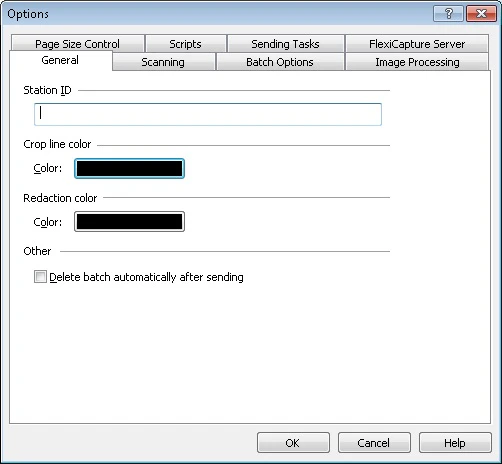 | **オプション** | **説明** |
| --------------------------------------------- | ------------------------------------------------------------------------------------ |
| **Station ID** | ステーションの識別子。 |
| **Crop line color** | このオプションを選択すると、切り抜き線の色を指定できます。色を選択するには、カラーボタンをクリックします。 |
| **Redaction color** | このオプションを選択すると、画像の墨消しに使用する塗りつぶし色を指定できます (**Page → Redact**) 。色を選択するには、カラーボタンをクリックします。 |
| **Delete batches automatically after export** | このオプションを選択すると、エクスポートの完了後に Batches が自動的に削除されます。 |
| **オプション** | **説明** |
| --------------------------------------------- | ------------------------------------------------------------------------------------ |
| **Station ID** | ステーションの識別子。 |
| **Crop line color** | このオプションを選択すると、切り抜き線の色を指定できます。色を選択するには、カラーボタンをクリックします。 |
| **Redaction color** | このオプションを選択すると、画像の墨消しに使用する塗りつぶし色を指定できます (**Page → Redact**) 。色を選択するには、カラーボタンをクリックします。 |
| **Delete batches automatically after export** | このオプションを選択すると、エクスポートの完了後に Batches が自動的に削除されます。 |