> ## Documentation Index
> Fetch the complete documentation index at: https://docs.abbyy.com/llms.txt
> Use this file to discover all available pages before exploring further.
# Send by Script オプション ダイアログ
> Send by Script オプション ダイアログでは、カスタム スクリプトを使用してバッチをエクスポートできます。スクリプト エディターを開き、JScript、VBScript、C#.Net、または VisualBasic.Net を選択します。
**Send by Script** オプション ダイアログでは、スクリプトを使用してバッチをエクスポートするためのオプションを指定できます。
## スクリプトでバッチをエクスポートする
次のいずれかの方法でダイアログを開きます。
* **File → Sending Options...** を選択し、**Script** タブをクリックします。
* [メイン ウィンドウのツールバー](/ja/flexi-capture/scanning-station/interface/toolbars) で **Send To** ボタンの横にある矢印をクリックし、**Send by Script...** のエクスポート プロファイルを選択します。
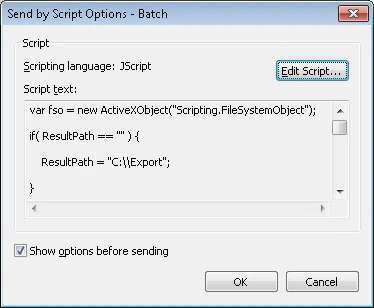 **Edit Script...** をクリックして、[スクリプト エディター](/ja/flexi-capture/scanning-station/shared/interface/script-editor) ウィンドウを開きます。
**JScript®**、**VBScript**、**C#.Net**、**VisualBasic.Net**、または **JScript.Net** を選択します。
**Edit Script...** をクリックして、[スクリプト エディター](/ja/flexi-capture/scanning-station/shared/interface/script-editor) ウィンドウを開きます。
**JScript®**、**VBScript**、**C#.Net**、**VisualBasic.Net**、または **JScript.Net** を選択します。
## Show options before sending
次回、スクリプトを使用してエクスポートする際にも同じオプションを再利用する場合は、このオプションを無効にします。次回のエクスポートの開始時にはダイアログは表示されません。