TrainingImage object (ITrainingImage interface) in the ABBYY FineReader Engine API — Represents a single training image containing a character image for user pattern training; settable via SetImageData or SetBitmapBits (Windows).
This object represents a single training image. It contains character image which can be used during user pattern training.The training image can be set by loading a region of an image document as a training image using the SetImageData method. In Windows, the training image can also be set by loading an image from memory using the SetBitmapBits method.
You should set the SmallCharsHeight and BaseLine properties to correct values; otherwise, the trained pattern will not function properly.
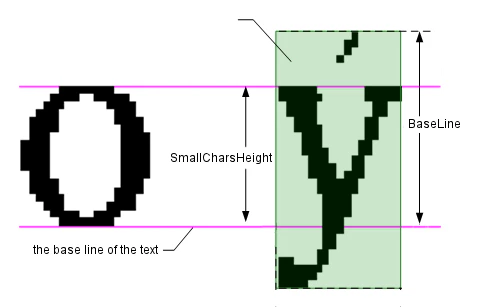
The bottom edge of most characters (except those with descenders, like p, g, Q) is the base line.The SmallCharsHeight property should be equal to the height of the lowercase letters in the line without ascenders or descenders (like c, a, o), even when you are training the pattern for an uppercase letter or a letter which has ascender/descender/diacritics (like A, b, y, or é).The BaseLine property should be equal to the distance from the top edge of the enclosing rectangle to the base line. Therefore, SmallCharsHeight = BaseLine for lowercase letters without ascender/diacritics (like m, e, u). For letters without descenders, BaseLine is equal to the letter height.
Show an illustration
On this picture, for the letter o set SmallCharsHeight and BaseLine to the same value equal to the letter height. For the letter ý, SmallCharsHeight will be the same as for o, and BaseLine is the distance from the top of the letter rectangle to the base line, as shown.
Contains the distance, in pixels, from the base line to the top edge of the cropped image of the character. The base line is the line on which the characters are located. The top edge of the image is determined by the character orientation. By default, the value of this property is 0, but you must specify the correct value of this property.
Specifies the height of small characters in pixels on the source image. By default, the value of this property is 0, but you must specify the correct value of this property.
Sets the training image data from the buffer in memory. The image should be isotropic (that is its horizontal resolution should equal the vertical one), black-and-white with 1 bit per pixel encoding.

 Object Diagram