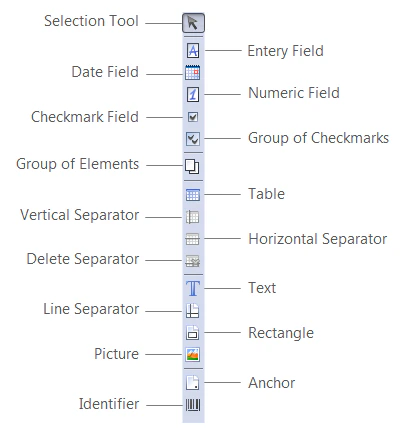
On the Form Elements toolbar you will find buttons for adding new elements to the form. Click a button to add the corresponding element to the form.
Screenshot of the Form Elements toolbar in ABBYY FormDesigner, showing its buttons for adding form elements such as entry, date, numeric, and checkmark fields, tables, separators, text, pictures, anchors, and identifiers.
Buttons on the Form Elements toolbar:
ButtonDescription
Selection ToolSelects a tool on the toolbar or an element on the form.
Entry FieldAdds an entry field element to the form.
Date FieldAdds a date field to a form.
Numeric FieldAdds a numeric field to a form.
Checkmark FieldAdds a checkmark field element to the form.
Group of ElementsAdds a group of elements
TableAdds an table element to the form.
Vertical SeparatorAdds a vertical separator to a table.
Horizontal SeparatorAdds a horizontal separator to a table.
Delete SeparatorDeletes a separator from the table.
TextAdds a text element to the form.
Line SeparatorAdds a line separator element to the form.
RectangleAdds a rectangle element to the form.
PictureAdds a picture element to the form.
AnchorAdds an anchor element to the form.
IdentifierAdds an identifier element to the form.
Group of checkmarksAdds a checkmark group element to the form.