
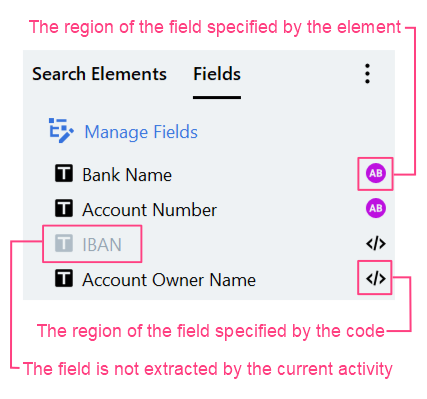
Map fields to search elements
When you select a field on the Fields tab, you will see a search element mapped to this field in the Get region from drop-down list. You can use this drop-down list to map the field to another element. You can also specify a field region using the code. The table below will help you decide which elements and element structures you can use to extract data to a field depending on the field properties.
When mapping a field/group with multiple items, you should also consider its full path, which includes the field/group itself and all its parent groups. The total number of groups/fields with multiple items in this full path should match the total number of Repeating Group elements in the full path to the search element you’re mapping to.
Field groups with multiple items that are mapped to code are excluded during the count.
Example
Let’s go over mapping possibilities for the fields in the following field structure: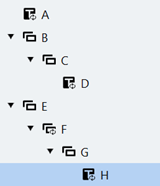
| Mapping possibilities for a particular field | Illustration |
|---|---|
| The field A has multiple items enabled. You can map this field to the first Repeating Group element of any branch or to its child elements (see elements parent_a, parent_d, f, and their child elements). However, you can’t map it to a Repeating Group in a Repeating Group (see element parent_h). | 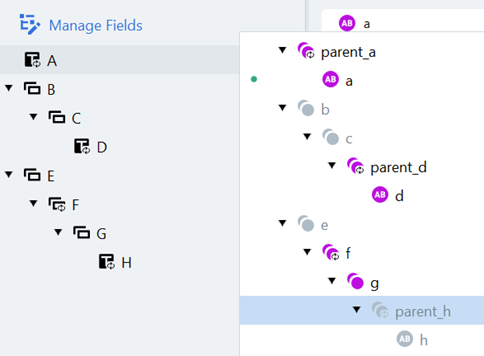 |
| The field D has the same mapping possibilities because groups B and C don’t have multiple items. | 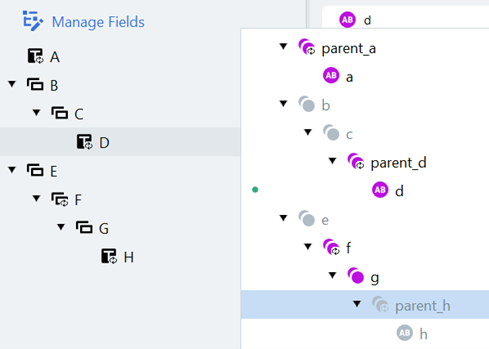 |
| The group with multiple items F can be mapped to the first Repeating Group element of any branch, but it can’t be mapped to child elements of such Repeating Group elements. | 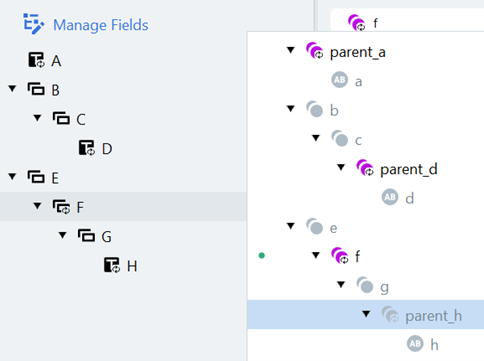 |
| Finally, the field H which lies in the group with multiple items F can be mapped only to the Repeating Group element parent_h or its child element h. Since one of the groups E, F, and G has multiple items, one of the elements e, f, and g must be a Repeating Group element in this case. | 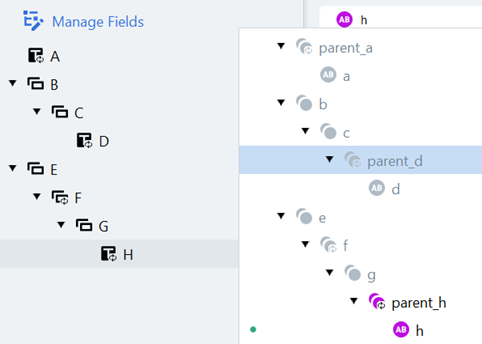 |