Verify extracted document fields against data catalog records — configure exact and fuzzy comparisons, auto-populate fields, and handle lookup errors.
When processing documents, you may need to verify the data extracted from them against records stored in data catalogs. Data Catalog Lookup rules automate this. With these rules, you can:
Compare invoices and orders against vendor and consignee databases.
Automatically fill in missing document fields using matching catalog records, such as:
Order numbers and amounts
Company details
Names and descriptions of goods and services
For more information on data catalogs for Document skills, see Using data catalogs.
Choose Data Catalog Lookup as the rule type, and then click Next.
3
Select the data catalog
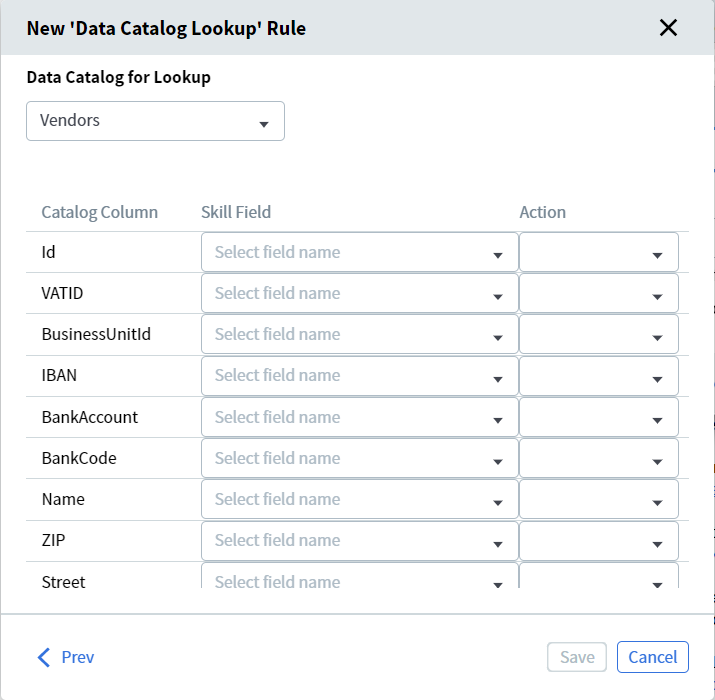
From the Data Catalog for Lookup dropdown, select the catalog to validate against.
To compare values against multiple data catalogs, create a separate rule for each.
4
Review the mapping table
A table appears listing the columns from the selected catalog in the Catalog Column column.
Data Catalog Lookup configuration table
5
Map fields
In the Skill Field column, map each catalog column to the corresponding extracted document field using the dropdowns. Leave a cell blank if you don’t need to search that column or if it isn’t present in your documents.
A single rule can reference fields from only one repeating group. To search values across multiple repeating groups, create a separate rule for each group.
6
Choose an action for each field pair
In the Action column, set how each field pair is processed:
Exact Comparison — For unique values such as tax IDs or product identifiers.
Fuzzy Comparison — For values that may differ slightly, such as street names or organization addresses. The threshold is 30% — at least 70% of the value must match. Fuzzy Comparison is not case sensitive.
Get Value from Data Catalog — Copies the catalog value into the corresponding document field. Available only if at least one field pair in the rule uses Exact or Fuzzy Comparison.
A link to the skill appears under the catalog in the Data Catalogs section.
The rule runs automatically for all document fields mapped during setup.
Lookup rules run during field extraction. If a user edits a field value manually, the rule does not re-run automatically.
Fields that feed a lookup rule can be populated by extraction, scripts, activities (such as Script or NLP), business rules, or manual entry.
To trigger the rules again, upload a new file to the skill’s document set, or send the document to manual review.
If a field value changes during manual review, the data catalog lookup rule re-runs. If a matching record is found, Vantage copies the catalog values into the mapped fields and those fields become read-only.
Data catalog lookup rules work reliably only if the comparison (exact or fuzzy) returns no more than one matching record. Otherwise, one of these errors occurs:
No records found — No catalog records matched.
Too many records found — More than one catalog record matched.
To avoid these errors, make sure at least one mapped field uses a value that’s either unique or can’t match multiple catalog records.
You can search for a data catalog record that matches the prefix of any word in the field value, not just the first word.
1
Open the search
Click the Search button to the right of the field value box for which a rule is configured.
2
Enter a search value
In the search bar, enter the value you want to find — full or partial, at least 3 characters. The system searches across all fields in the selected data catalog.
3
Select the matching record
Click a result to select it. The selected catalog value is copied into all document fields linked to that catalog column during rule setup.
After a document field is filled from a catalog record, manual editing is disabled. If the value is incorrect, repeat the lookup and select a different record — the document fields update to match the new catalog values, and the rule runs again.If the required value isn’t in the data catalog, click Clear Document Fields or press Ctrl + Del to restore the field values extracted from the document, without applying any catalog values.