
Vantage Scope is the container every other UiPath connector activity must live inside — Use Skill, Get Results, and Map Fields all run nested within a Scope. The Scope holds the credentials, proxy settings, and Public API Client settings that the nested activities share, so you configure connection details once per workflow. For more information, see:Documentation Index
Fetch the complete documentation index at: https://docs.abbyy.com/llms.txt
Use this file to discover all available pages before exploring further.
External Identity Provider
Set up SSO via an OAuth 2.0 or SAML 2.0 identity provider for your Vantage tenant.
Public API client
Create and configure a Public API client to authenticate to the Vantage API.
Authentication
Choose an OAuth 2.0 flow and obtain an access token.
Activity properties
Connection Settings
| Property | Type | Description |
|---|---|---|
| Authorization grant type | IEnumerable<AuthorizationGrantType> | The grant type that is used for authorization: ResourceOwnerPassword or ClientCredentials. |
| Password | String | The password used to connect to ABBYY Vantage. |
| Secure Password | SecureString | The secure password used to connect to ABBYY Vantage. |
| Server URL | String | The ABBYY Vantage server address. |
| Tenant | String | The ABBYY Vantage tenant name or tenant identifier. This property is only required if the user whose credentials are used to connect to the ABBYY Vantage server is registered in several (more than one) tenants on the server. The tenant name can be found on the Vantage sign-in page in your browser when you enter your password. |
| Username | String | The user e-mail address used to connect to ABBYY Vantage. |
Proxy Settings (optional)
| Property | Type | Description |
|---|---|---|
| Enable Proxy | Boolean | Allows you to use a proxy server to route HTTP requests. |
| Server URL | String | The proxy server address (e.g. http://127.0.0.1:8080). |
| Username | String | The username used to connect to the proxy server. |
| Password | String | The password used to connect to the proxy server. |
| Secure Password | SecureString | The secure password used to connect to the proxy server. |
Public API Client Settings (optional)
| Property | Type | Description |
|---|---|---|
| Client Id | String | Vantage application identifier. |
| Client Secret | String | Secure Vantage application key. |
| Secure Client Secret | SecureString | Secure Vantage application key as a secured string. |
Manage credentials
Vantage user password, proxy password, and Client Secret in the client settings can be set in the Scope Activity either in a string parameter or in the corresponding parameter with theSecureString type.
A password of type String is stored as plain text in the XAML project file, which is not safe. A String password is recommended for use only when configuring the Use Skill and Map Fields activities to obtain the list of skills, or for debugging your UiPath process. Once the process is fully configured:
- If you use Resource Owner Password Credentials Flow, remove the Password property from the Vantage Scope activity and set up the Secure Password property.
- If you use Client Credentials Flow, remove the Client Secret property from the Vantage Scope activity and set up the Secure Client Secret property.
Configure the Vantage Public API client
When you create a client in ABBYY Vantage, configure the following in the OAuth 2.0 Flows Settings section of the client settings, depending on the grant type you use:| Authorization flow | OAuth 2.0 client settings to enable |
|---|---|
| Resource Owner Password Credentials Flow | Allow Resource Owner Password Credentials Flow |
| Client Credentials Flow | Allow issuing refresh tokens to refresh access tokens, Allow client credentials flow, plus the required roles selected via Manage Roles |
Fill in the activity fields
If all the properties in the Vantage Public API Client Settings are empty, the default ABBYY Vantage client is used.
- Resource Owner Password Credentials Flow
- Client Credentials Flow
Fields to be filled for this flow: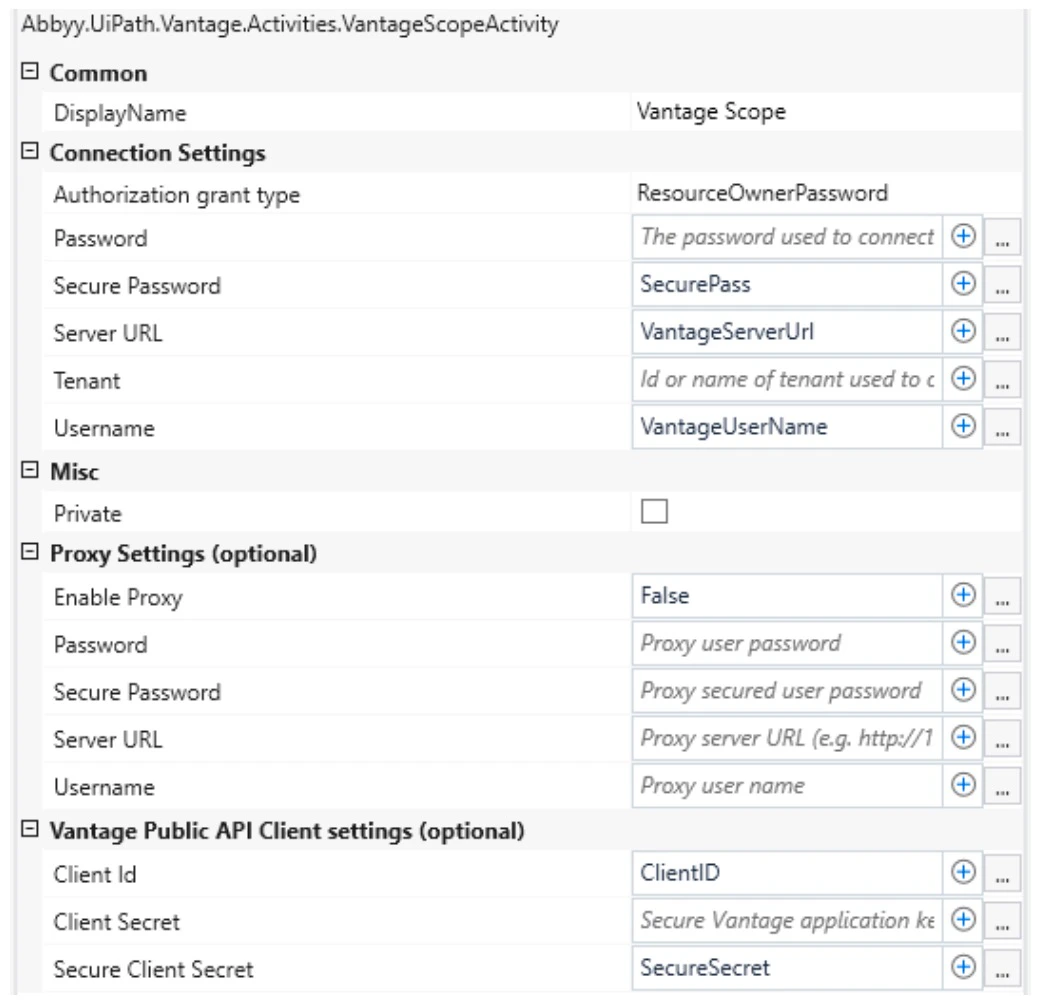
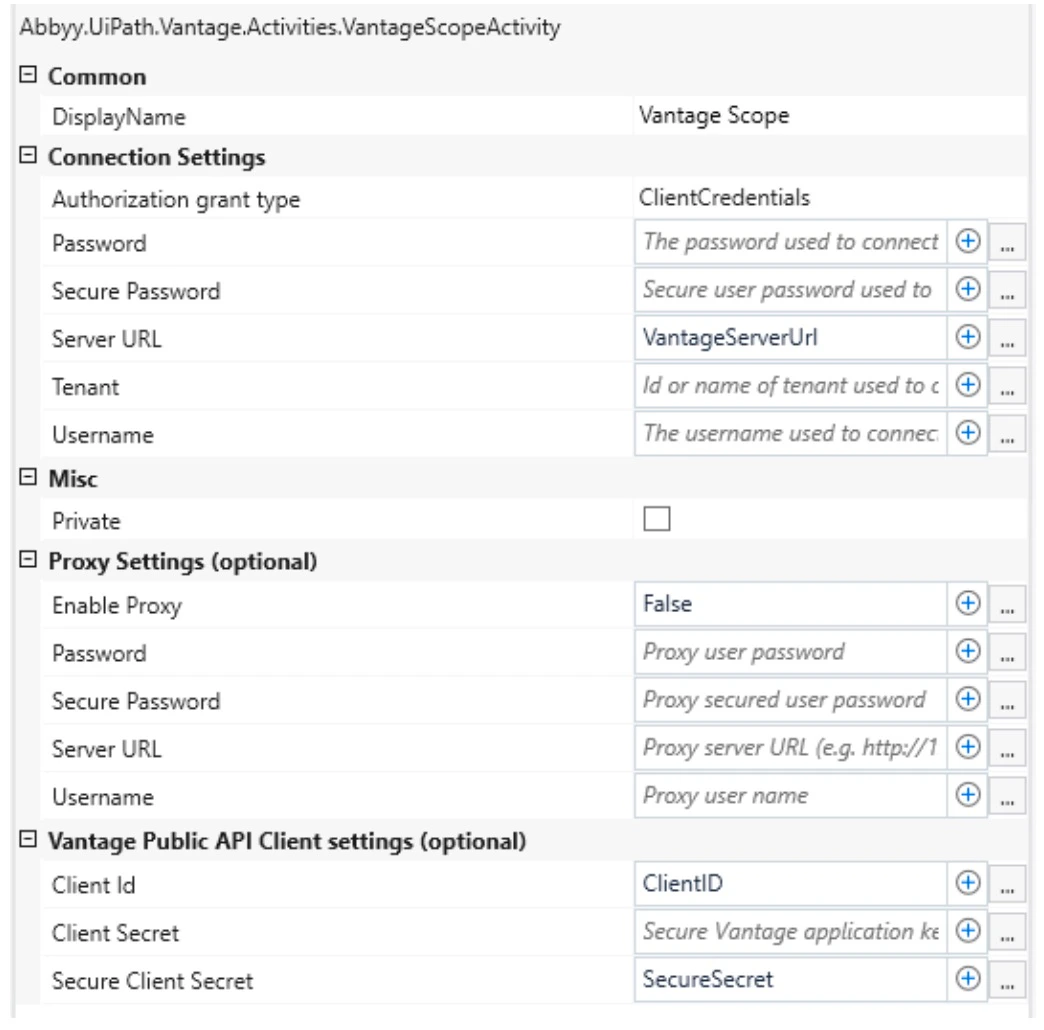
Configure proxy settings
You can configure connector requests at runtime to go through a proxy server. The following proxy authentication types are supported: Basic, NTLM, IP authentication, and transparent proxy. To use a proxy, select the Vantage Scope activity. In the Proxy Settings (optional) properties group, set the value of the Enable Proxy property to"true" and then specify the address of your proxy server in the Server URL property.
- Basic authentication
- NTLM authentication
In the Username and Password / Secure Password properties, specify the proxy connection credentials.
Related topics
Use Skill activity
Create a Vantage transaction to process a document with a skill.
Get Results activity
Retrieve the processing results from ABBYY Vantage.
Map Fields activity
Save extracted field values to UiPath variables.