
The NLP module is not included in a standard FlexiCapture installation and needs to be installed separately. It also requires a license of a specific type.
 icon.
icon.
Named Entity element properties for the target object
You specify the target object type on the Named Entity Recognition tab of the element’s Properties dialog box. To open the Properties dialog box, right-click the element in the FlexiLayout window and select Properties… on the shortcut menu.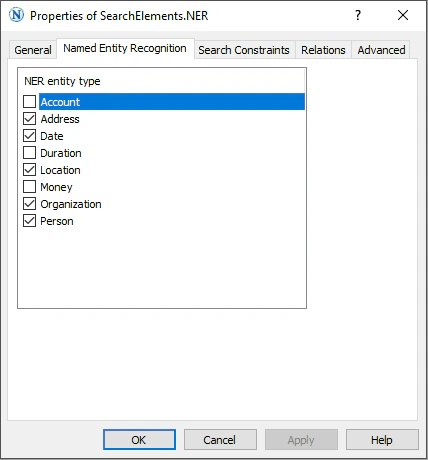
Show extracted named entities on the image
To display the extracted named entities on the document image, follow these steps:1
Open the FlexiLayout properties
Select FlexiLayout > Properties…, or press Alt+Enter.
2
Open the advanced pre-recognition settings
On the General tab, select Advanced Pre-recognition Properties….
3
Enable named entity extraction
On the Advanced tab, in the Extract named entities section, select the Extract named entities option.
4
Apply the changes
Click OK.