
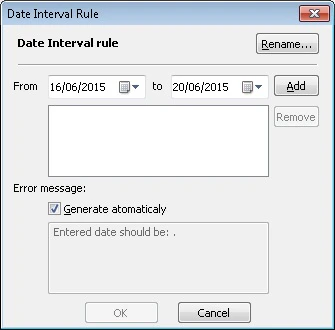
Restrict admissible dates in a date field with Date Interval rules: create, rename, and edit intervals in the Date Interval Rule dialog box.
You can impose constraints on admissible values for a date field element by using rules.To add a rule, click the Add… button on the Constraints tab of the element properties. In the Validation Rule: Select Rule Definition window that will open, double-click the Create New Rule … item in the Date Interval rule list to create a new rule. The Date Interval Rule dialog box will open.Rename… — Click this button to rename the rule. In the dialog box that will open, enter a new name of the rule and click OK.From … to:
Add — Adds the entered date interval to the list.
Remove — Removes the selected interval from the list.
Error message — Generate automatically: If this option is selected, the text of the error message will be generated automatically. Deselect the option, if you wish to enter a custom text.