
All Document skills used in a Process skill must use the same Technology Core version.
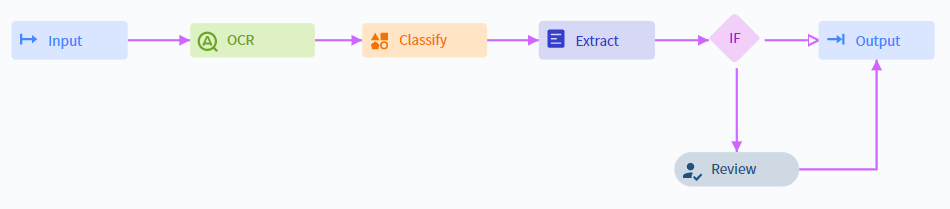
Example Process skill workflow with activities connected by directional arrows
Build and publish a skill
1
Set up a document processing workflow
Either set up a custom workflow manually, or select one of the preset workflows.
2
Configure activity parameters
Set the required parameters for each activity in the workflow.
3
Publish the skill
Publish the skill to make it usable.
The Try option for launching a transaction is not available for Process skills.
Preset workflows
Preset workflows are available in the Actions pane of the Skill Designer. Vantage includes the following presets.Simple Document skill workflow
For processing documents of a single type. Imports documents, extracts fields, and uploads results.Multiple Document skills after Classification
For processing various document types in one workflow. Imports documents, classifies them, routes each type to the right Document skill, and uploads results.Multiple Document skills after Classification with manual review
Same as above, plus a Manual Review step that verifies only documents that fail specific business rules defined by the workflow designer.Modify a workflow
Add an activity
1
Select the preceding block
Click the block after which you want to add the activity.
2
Pick an activity
In the menu that appears to the right, select an activity.
3
Connect the blocks
Connect the new activity to the existing blocks using directional arrows.
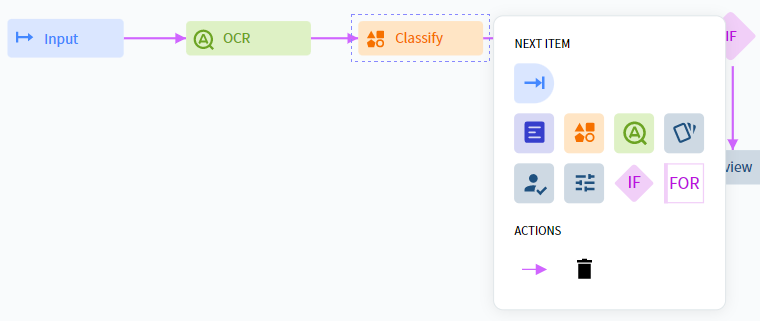
Adding an activity to a workflow
Remove an activity
1
Select the block
Click the block to select it.
2
Delete
In the menu that appears, click Delete.
3
Reconnect remaining blocks
Connect the remaining blocks using directional arrows as needed.
Create a custom workflow
1
Add an activity
Select an activity in the Activities pane and drag it into the Skill Designer window.
2
Configure the block
Click the block and select the required activity from the menu that appears. Click the block again to close the menu.
3
Configure activity settings
After adding all processing steps, click each activity and configure it in the Actions pane on the right.