
1
Open Field options
In the data form, click the field settings button next to the field.
2
Select a data type
In the Field options dialog, select the data type from the dropdown.
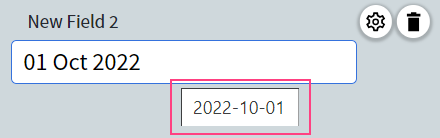
Hover a field to see its normalized value
Normalize dates
When normalizing dates, Vantage converts extracted dates into ISO 8601 format:YYYY-MM-DDfor datesHH:MM:SSfor time
Examples
If both Day-Month-Year and Month-Day-Year formats are enabled, Vantage may not be able to normalize the date unambiguously. In that case, you can choose between the two candidate dates.
- The date is incomplete — for example,
4:39 am(time values are only normalized when extracted together with a date). - Adverbs of time are used instead of exact dates — for example,
last month,a few days ago. - Extra words or characters appear next to the date or time — for example,
2016/06/15 22. - Uncommon date representations are used — for example,
14 Jumada Al-Awwal 1445.
Normalize numbers
Vantage can normalize numbers using Western or Indian digit grouping:- Western — Groups digits by threes from right to left, using commas to separate thousands, millions, and so on.
- Indian — Groups the first three digits from the right, and then by twos for tens of thousands, lakhs, tens of lakhs, crores, and so on.
.) to separate integer and fractional parts. For accepted separators, see Data types.
Examples
Numbers written out in words are normalized only when they’re in English and English is selected in the skill settings.
Vantage may not be able to normalize a number in the following cases:
- Extra words or characters appear next to the number — for example,
EURO12,345.678or5 kilos. - There is an irregular number of digits between the fractional and integer parts, or between the decimal and thousands parts — for example,
123,456,7890. The fractional part must contain 3 or fewer digits. If123,456,789is extracted, the normalized value is123456789; if123,456,78is extracted, the normalized value is123456.78. - Irregular number representations are used.
Normalize money amounts
A money amount contains a number value and a currency symbol, with the symbol before or after the amount. When normalizing, Vantage outputs the currency symbol first, followed by the amount normalized as a number. Currency is identified by symbol or name —€, EURO, and euros all map to the euro. The normalized value uses the exact symbol or name found in the extracted text.
Examples
Amounts written out in words are normalized only when they’re in English and English is selected in the skill settings.
12 ttt.