
UiPath Orchestrator connection settings
With UiPath Cloud Platform, an old account from UiPath Community Orchestrator has to be migrated to the new authentication method first, by resetting the password. For more information, see Consuming APIs with the new cloud Orchestrator.
Server address examples
For UiPath Enterprise Orchestrator, specify the address of the Orchestrator web application:Repository example
For UiPath Cloud Platform, specify your service name: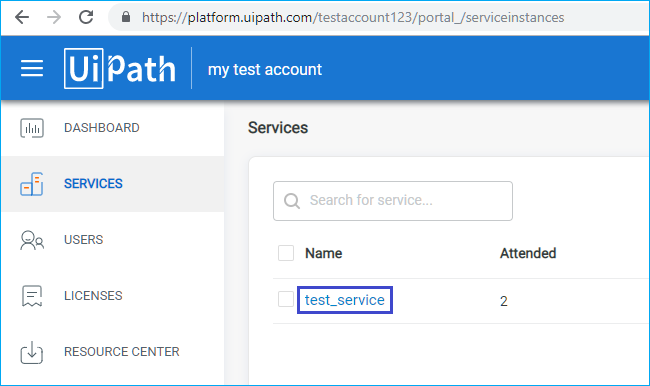
Required Orchestrator user roles
Assign the following roles to the user in Orchestrator: view queues, create transactions, and view units.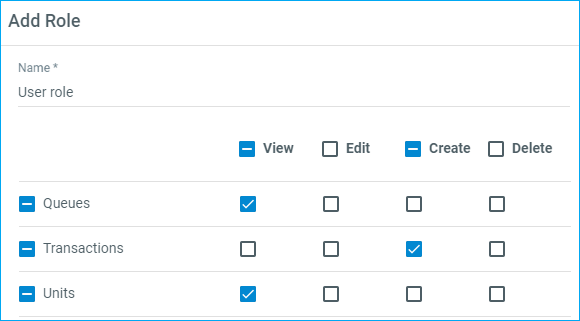
Export file names
In the FileName field, specify the template used to generate the names of the export files.
The
<FileNameWithoutExtension> tag works when the image was received from the UiPath activity, because the batch then holds this registration parameter with the name of the source image file.
Orchestrator queue name
In the DmsMetadataTemplate.Name field, specify the Orchestrator queue name: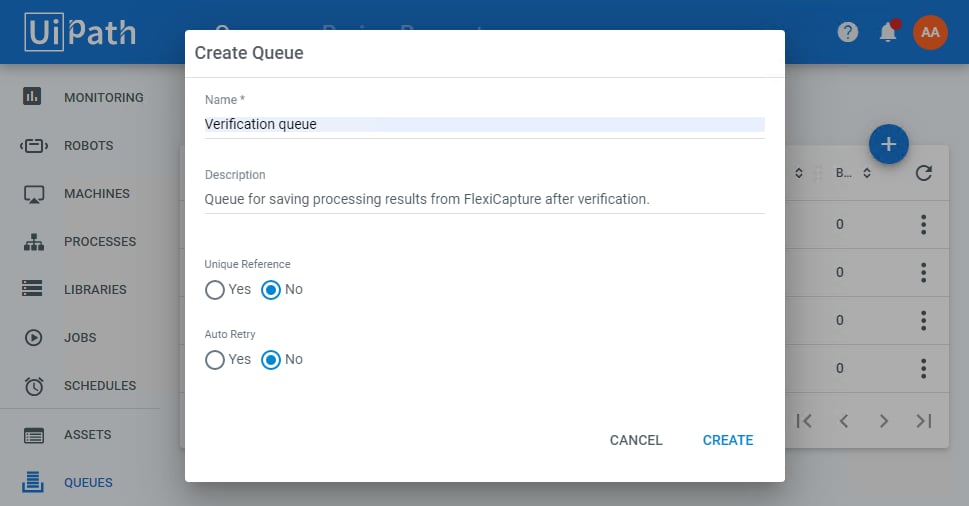
Output image options
The ExportImageSavingOptions option covers the settings available for output images, such as the image format options and the ability to redact fields holding confidential information. For more information, see IExportImageSavingOptions.Field mapping
Map the fields to export the recognized metadata. For each Document Definition field whose value you want to export, specify its name in the transaction. Only the Document Definition fields that have been mapped are exported to the transaction. Any number of fields can be mapped. If you configure export options using a script, the field pair must be in the following format:Additional UiPath export options
Specify additional UiPath export settings using the DmsSpecificOptions property. In each of the following code samples, the first attribute is the option name and the second attribute is the option value.AuthenticationType
AuthenticationType sets the authentication type used when logging in to UiPath Orchestrator. It has only two values,Basic and OAuth2.
For UiPath Cloud Platform Orchestrator, this option is required and its value must be OAuth2. For UiPath Enterprise Orchestrator, the option is not required, and its value is Basic.
Reference
Reference specifies a reference to use when creating a transaction. SpecifyDocument.Batch.Id.ToString() as the value to use the batch identifier as the reference.
OrganizationUnitName
OrganizationUnitName exports the processing results to the specified Orchestrator organization unit. This option is available only for UiPath Enterprise Orchestrator, and the Organization Unit feature has to be enabled in Orchestrator. Specify the name of the organization unit as the option value.AccountLogicalName
AccountLogicalName specifies which UiPath Cloud Platform account the processing results are exported to. Use it when several UiPath Cloud Platform accounts are available to the user. This option is available only for UiPath Cloud Platform Orchestrator. The account logical name is the editable part of the Orchestrator site URL in the Orchestrator Account Settings. It is also visible in the browser’s address bar after you log in to your account.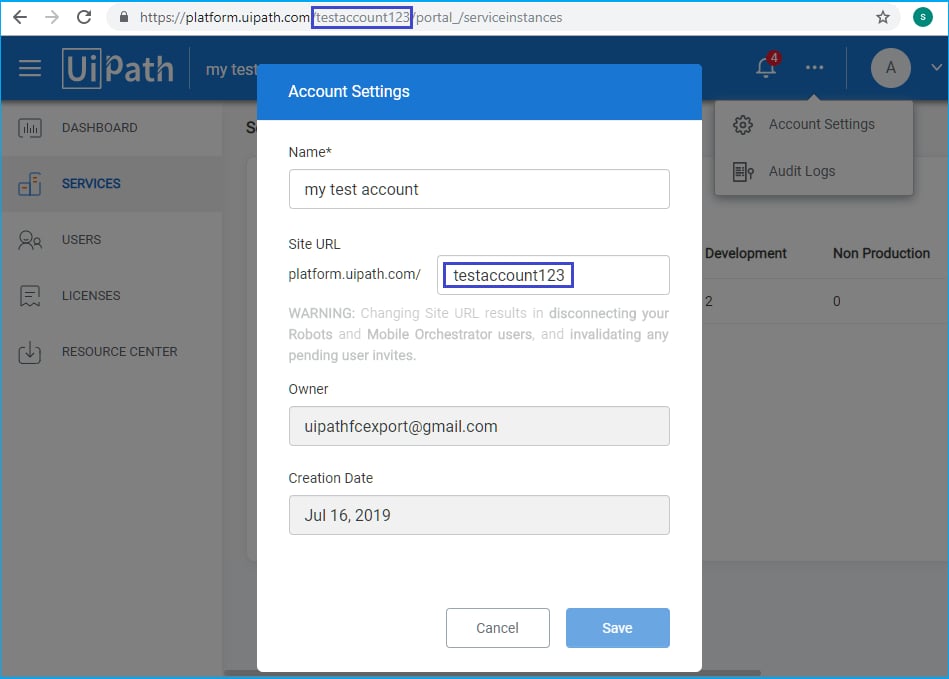
Several options in one script
To use several options in a single export script, list them as elements of the Option array, separated by commas:Saving document images
The SaveDocumentImages option indicates whether image files are saved to a UiPath Orchestrator transaction. Set it totrue to save images, or to false to save none.
Reference files
Examples of setting up the export options are in the\Single-task package\Samples\FlexiCapture Scripts folder of the connector installation path. Look for the files named default.config.xml and UiPath - ExportScript - Configure by script (Attended service).cs.