
The ANY TEXT field at the bottom of the document has no fixed name. Its name is unique on each document, so you cannot search for it by name. Locate it by its position relative to other elements instead. First, try the existing IdentityNumber element. On all the test images, the ANY TEXT field appears below it.
Do not use the separators that appear on some images. They are not consistent or reliable elements. For more information, see Step 6.

Search below the IdentityNumber element

1

Create the TextField element

Create a Paragraph element named TextField for the ANY TEXT field.
2

Relate it to the IdentityNumber element

On the Relations tab, set the TextField element’s location to Below the IdentityNumber element.
Match the FlexiLayout with the test images. On some images the hypothesis also includes barcode digits, so describe the location of the ANY TEXT field more precisely.

Refine the search with a White Gap element

Add a horizontal White Gap element for the gap between the text and the barcode, and use it as the reference element for the ANY TEXT field.
1

Create the BetweenGap element

Create a White Gap element named BetweenGap. Place it above the TextField element in the tree of elements.On the White Gap tab, set the orientation of BetweenGap to Horizontal.
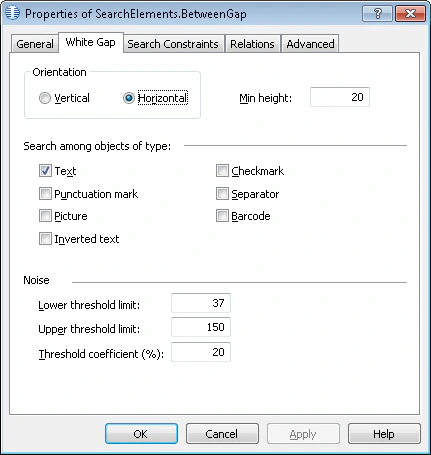
Screenshot of the White Gap tab of the BetweenGap element properties in ABBYY FlexiLayout Studio showing Horizontal selected as the orientation.
2

Set the search area for BetweenGap

On the Relations tab, set the search area to the region below the IdentityNumber element, no farther than 200 dots from the bottom boundary of the BarcodeHeader element.
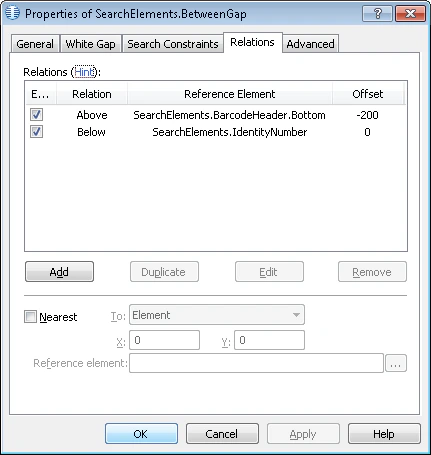
Screenshot of the Relations tab of the BetweenGap element properties in ABBYY FlexiLayout Studio showing the search area defined below the IdentityNumber element and within 200 dots of the bottom boundary of the BarcodeHeader element.
3

Point the TextField element at the gap

On the Relations tab, set the TextField element’s location to Below the BetweenGap element, with Offset = 0.
Match the FlexiLayout with all the test images. The hypothesis for the TextField element no longer contains unwanted data, so the BetweenGap element reliably locates the TextField element.

Create the TextField block

Create a Text block named TextField and specify the TextField element as the source element.